
Make your AI your personal finance coach.
Finances For AI keeps your spending, budgets, goals, subscriptions, debts and net worth in one private record your assistant can read and update. Say what you spent or drop in the receipt; ask how you are doing and get a straight answer, with the chart in the chat.
Free forever for up to 1 GB of storage and 50 transactions a month. Plus is $24 a year. (Just $2 per month.)
- Budgets that speak up. Log a purchase and hear when a budget passes 80% or runs out.
- Subscriptions watched. Due dates, price changes and the ones you forgot, in one list.
- Every receipt kept. Open any receipt you have added, photo or PDF, whenever you need it.
You: How am I doing this month?
AssistantGroceries are at $412 of $500 with nine days left, so about on pace. Eating out passed its $150 budget on the 18th. Two subscriptions renew next week, $31 together. Net worth is up $640 since September, mostly the car loan.
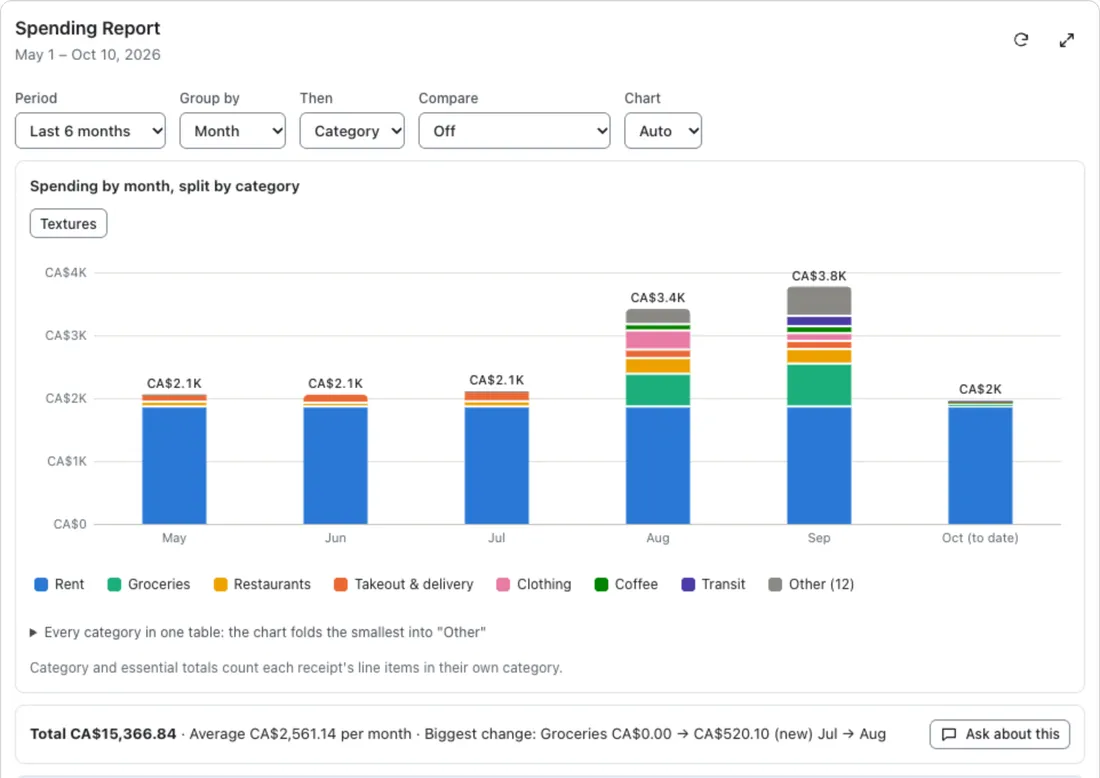
A real screen with demo data; the conversation around it and its figures are drawn.
How it works
Set up in a minute. Keep up by talking.
Add it.
To ChatGPT or Claude, or any other MCP assistant (MCP is the open standard for connectors), with one address. Sign in once with an emailed code.
Drop in a receipt, or just say it.
“Here's my receipt” with a photo. “I spent $42 at Costco.” A 30-item receipt is one transaction, itemised.
Ask how you're doing.
“Am I over on groceries?” “What's my net worth after the car?” Answers come as text, or as a chart in the chat.
Free forever for up to 1 GB of storage and 50 transactions a month. Plus is $24 a year.
Examples
Just talk to it.
The six questions it was built around.
What category did I spend most on last month?
Top five categories, with totals and share of spend.Did I buy batteries, milk and dog food this week?
Yes or no for each, with the date and the receipt.Show me a graph of my spending over the past 3 months.
The Spending Report: a column per month, stacked by category.What did I spend on essentials vs non-essentials?
Two totals, the split, and the previous period beside them.How much did I spend on takeout over the past year?
Twelve monthly totals and the year's sum.How much did I spend on rent in September 2025?
One number, with the transaction behind it.
The everyday things people say → · How the answers are worked out →
Receipts
Drop it in. It's logged, and kept.
Manual trackers fail because of the typing. Finances For AI takes it away.
Photo
Attach a receipt: one photo, several pages, or a PDF.
Itemised
Your assistant reads it. Finances For AI checks the maths, catches duplicates and suggests a category for every line.
Reviewed
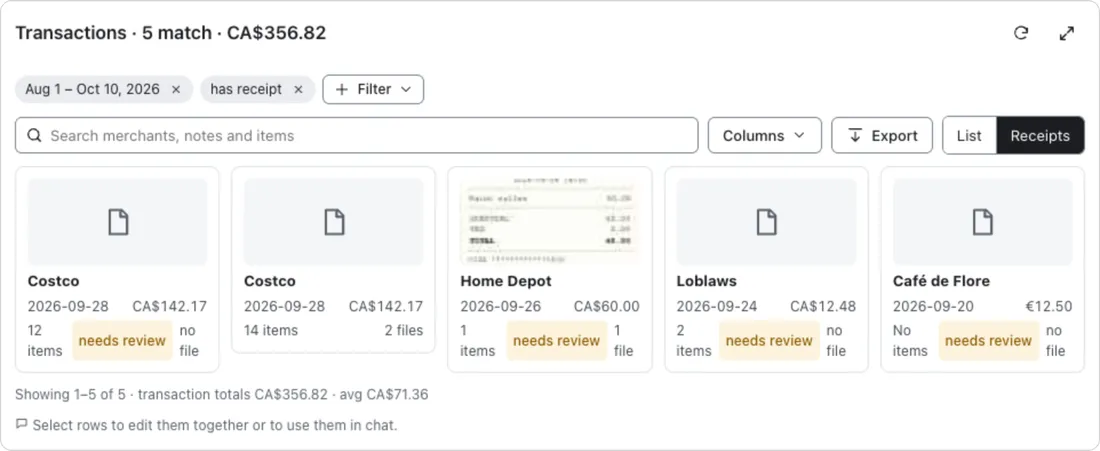
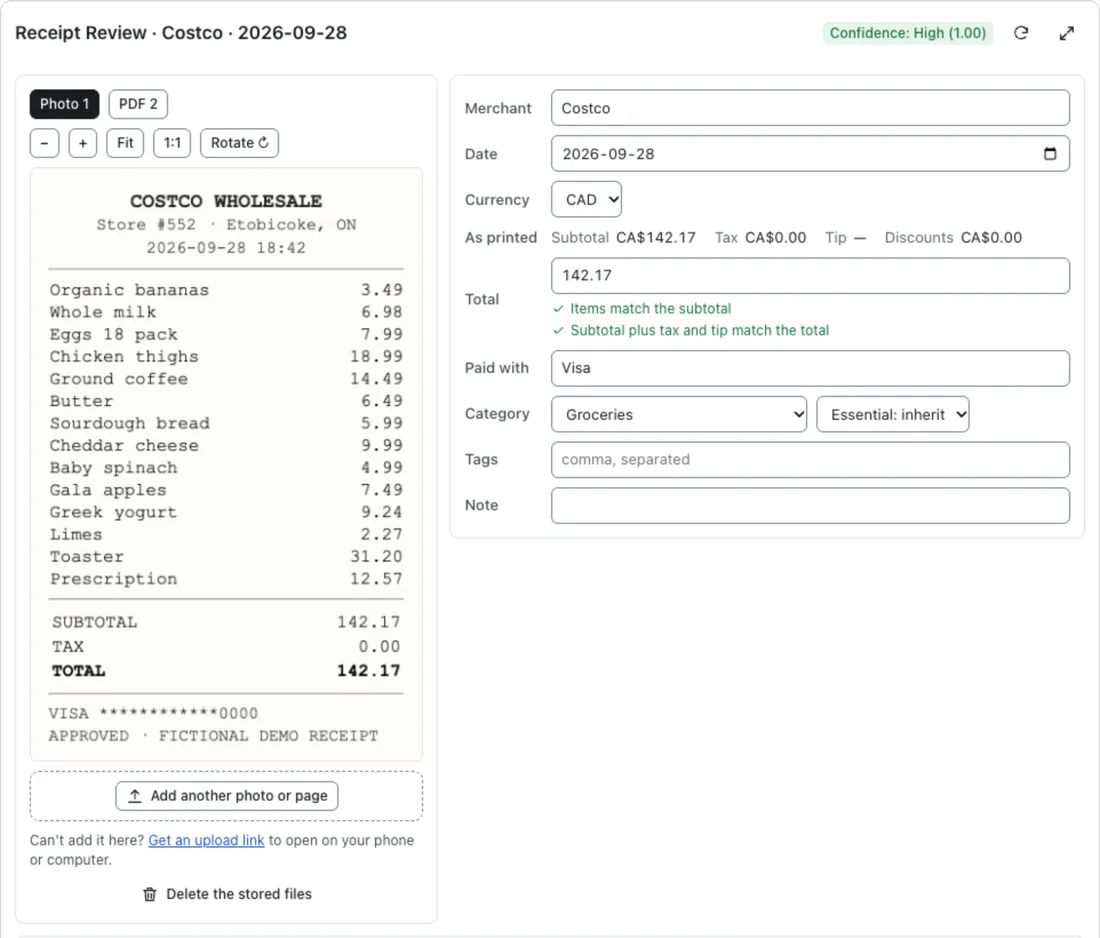
A review screen shows the receipt beside the fields and items. Fix a line, confirm, or discard.
Every receipt you add is kept, photo or PDF, all pages, and opens again whenever you need it. Card numbers are removed from what is recorded. Turn image storage off whenever you like.
You: Show me my receipts since August
AssistantHere are the five receipts since 1 August. Four still need a look.
Features
Everything a coach needs to see. Nothing it doesn't.
A coach here reads your numbers back against what you set, says what changed and where the money went.
Spending by category
Starter categories you can rename or replace. Slice any answer by category, merchant, tag, month or payment method.
Budgets that speak up
A monthly target per category or overall. Log a purchase and hear when a budget passes 80% or runs out.
Subscriptions and bills
Every renewal in one list with its next due date and monthly cost. Price changes kept; pause, cancel or skip a month.
Net worth
Record your balances, and what you owe, when you check them. Net worth is assets minus debts, drawn over time with contributions and payments per period.
Goals
A target on a savings account, or a fund you add to. Progress, pace, projected date, and whether you are ahead or behind.
Receipts and line items
Receipts become itemised transactions. Search by item (“did I buy batteries in March?”) and categorise single lines.
Screens
See it in your chat.
Real screens with demo data.
You: Here's my Costco receiptAttached: receipt photo
AssistantLogged: Costco, 28 September, CA$142.17, 14 items. Twelve are groceries; the toaster is under Home & furniture. The items add up to the total. Check below, then confirm.
You: Show me my month so far
AssistantHere is September at a glance.
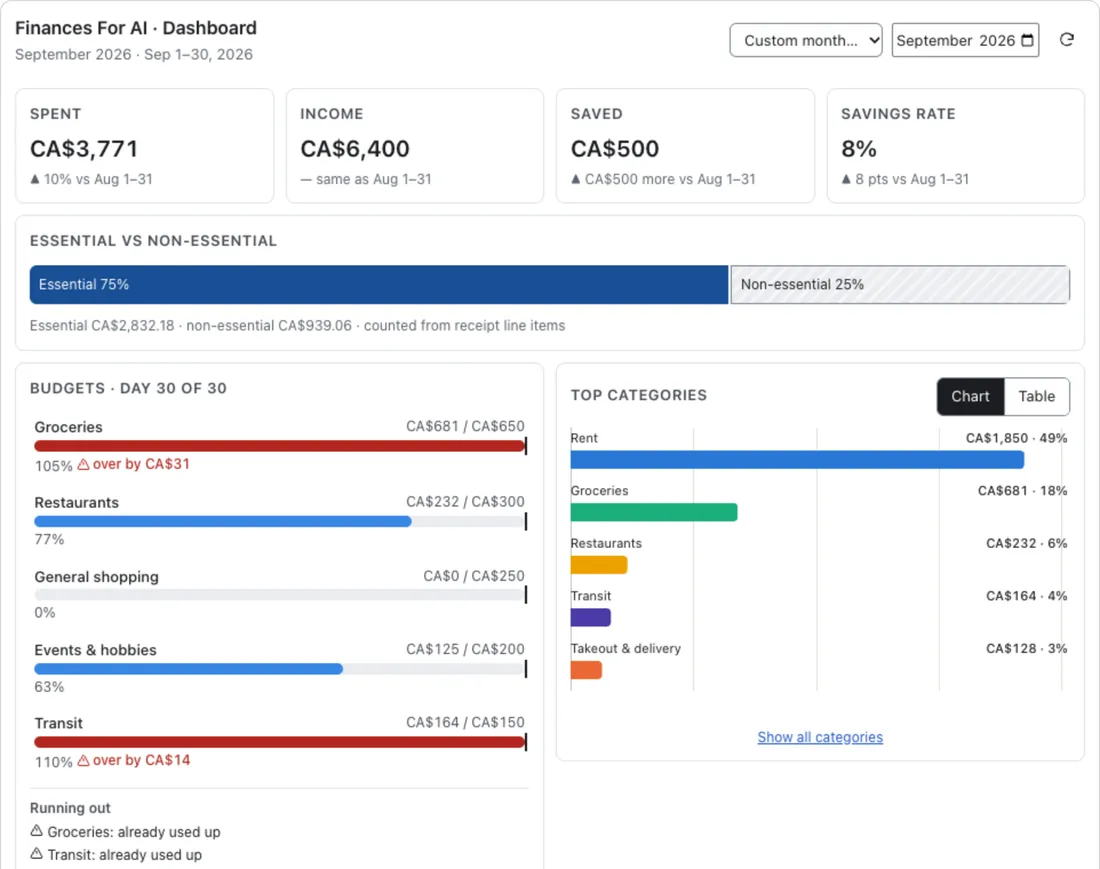
Also in the chat: Transactions, Recurring, Net Worth, Goals, Categories & tags, and a Setup Wizard for currency, categories and bills.
Free forever for up to 1 GB of storage and 50 transactions a month. Plus is $24 a year.
AI-first
Built for where you work
Want an AI money coach? The assistant you already use can be one, with the right tools behind it. Finances For AI is those tools: a service your assistant connects to, not another tab to keep open. Ask in plain language; the work is done and the record is kept. It is one of three products from WAB Apps built the same way, at a fraction of the cost of traditional software. WAB Apps runs its own business on the products it makes.
Privacy
Your records, in their own database.
We hold only what you log. Finances For AI does not connect to a bank, card or brokerage. Every record comes from you: a sentence, a receipt or a balance you read off. Nothing syncs in the background. (We're considering adding bank account sync. If you'd like it, ask your assistant to log the feature request.)
- What we store. What you log, the receipt files you add (unless image storage is off) and your sign-in email.
- Where it lives, and how it's protected. One database per account on Cloudflare, encrypted in transit and at rest. Sign in by one-time code, Google or Apple. Every change is logged.
- Export and delete any time. CSV or JSON, and receipt files as a ZIP, on every plan. A 30-day trash. Delete the whole account from your account page.
- Not used for training or ads. Finances For AI runs no AI model of its own, doesn't sell your data and shows no ads.
Plans
$24 a year. Not $100.
You pay for the record, not for the AI. Your assistant does the reading and the talking. Both plans have every screen and report. Plus removes the monthly limit, adds receipts by email and keeps more receipt files.
Free
$0 forever
- Logged transactionsEach purchase, payment or deposit you add counts as one, and so does a receipt with many items. Bills that post themselves, edits and deletions don't count.
- 50 per calendar month
- ReceiptsSpace for your receipt photos and PDFs. A receipt counts as one logged transaction, however many items it has.
- 1 GB
- Active goalsA target on a savings account, or a fund you add to. Each goal shows its progress, its pace and when you'll reach it.
- 2
- HistoryEverything you've logged stays in your record until you delete it. Reading and editing never stop, even at the monthly limit.
- Full, forever
- Screens and reportsEvery report works on both plans. Screens like the Dashboard show in assistants that support MCP Apps, and elsewhere the answers come as text.
- All
- Receipts by emailForward an emailed receipt to your own private address. It waits in an inbox until you ask your assistant to record it.
- Not included
- ExportTake everything as CSV or JSON, and your receipt files as a ZIP. It works any time, even at the monthly limit.
- Always
Plus
$24 USD a year, plus applicable taxes. Cancel any time.
- Logged transactionsEach purchase, payment or deposit you add counts as one, and so does a receipt with many items. Bills that post themselves, edits and deletions don't count.
- No monthly limit
- ReceiptsSpace for your receipt photos and PDFs. A receipt counts as one logged transaction, however many items it has.
- 20 GB
- Active goalsA target on a savings account, or a fund you add to. Each goal shows its progress, its pace and when you'll reach it.
- Unlimited
- HistoryEverything you've logged stays in your record until you delete it. Reading and editing never stop, even at the monthly limit.
- Full, forever
- Screens and reportsEvery report works on both plans. Screens like the Dashboard show in assistants that support MCP Apps, and elsewhere the answers come as text.
- All
- Receipts by emailForward an emailed receipt to your own private address. It waits in an inbox until you ask your assistant to record it.
- Included
- ExportTake everything as CSV or JSON, and your receipt files as a ZIP. It works any time, even at the monthly limit.
- Always
- A logged transaction is one purchase, payment or deposit you add; a receipt with 30 items is one. Bills that post themselves, edits and deletions don't count. At 50 in a month, adding pauses until the 1st.
- 30-day money-back guarantee on the first year's payment, once per person. Ask from your account page or by email. A refund returns you to Free and deletes nothing.
- Plus renews yearly until you cancel, with a reminder 7 days before. Cancel any time from your account page. Prices in US dollars; tax is added at checkout where it applies.
FAQ
Questions
What is Finances For AI?
A private record of your spending, budgets, subscriptions, goals, debts and net worth that your AI assistant reads and updates. You talk; it keeps the record and shows the charts in the chat. It runs inside ChatGPT, Claude and other assistants that support remote MCP servers.
Does Finances For AI include any AI?
No. Finances For AI is the system of record your AI works from to manage your money. It stores your financial data securely in your own account and is not tied to any AI provider. The same account works from ChatGPT, Claude and any MCP assistant, and it stays yours if you switch.
Does it connect to my bank?
No. Finances For AI records what you tell it or show it: a sentence (“I spent $42 at Costco”), a receipt, or a balance you read off your account. There is no bank, card or brokerage connection. A full history means logging as you go, or pasting rows for your assistant to enter. (We're considering adding bank account sync. If you'd like it, ask your assistant to log the feature request.)
How do receipts work?
Attach a photo or PDF in the chat. Your assistant reads it (ChatGPT and Claude can both read images). Finances For AI records the merchant, date, items, tax and total. It checks that the numbers add up, looks for duplicates and suggests categories. A review screen shows the receipt beside the result, so you can fix a line before confirming. Card numbers are removed from what is recorded. The receipt itself is kept with the transaction unless you turn image storage off.
How do goals work?
Say “set a goal: $4,000 for a trip by next August”. A goal either watches a savings or investment account you record balances for, or is a fund you add to (“put $300 toward the trip”). Each goal shows its progress and its pace over the last 90 days. It also shows the date you'd reach it at that pace, and whether that is ahead of, on track for or behind your date. When a goal is reached, the assistant tells you once. Free keeps 2 goals active at a time; Plus has no cap.
What happens at 50 transactions?
On the Free plan, adding new transactions pauses until the first day of the next month. Everything you already logged stays. Every report and screen works, subscriptions keep posting, edits work, export works. You'll see a short note in the chat with the reset date; plan details are on this site.
How does Plus renew?
Plus is $24 a year and renews automatically on the date you subscribed. Stripe emails you a reminder 7 days before each renewal. If a renewal payment fails, Plus stays on for 14 days while the card is tried again. Update the card from your account page to keep Plus without a gap.
How do I cancel?
Any time, from your account page (Manage billing opens Stripe's billing page). Plus stays until the end of the year you paid for. Then the account moves to Free. Nothing is deleted, and you can subscribe again whenever you like.
Can I use it in both ChatGPT and Claude?
Yes. One account, one database. Add Finances For AI in each assistant, sign in with the same email, and both see the same records. The same goes for other assistants that support remote MCP servers.
What if ChatGPT changes?
Finances For AI is not a ChatGPT feature. It's a service you connect to ChatGPT, Claude or another MCP assistant. Your data lives in your Finances For AI account, not inside any assistant. If one assistant changes its rules or availability, the others keep working. You can export everything at any point.
Is my data used to train AI?
Not by us. Finances For AI runs no AI model of its own. It never uses your records for training, advertising or anything but showing them back to you. Your conversation itself belongs to the assistant you use. Check ChatGPT's or Claude's data controls for how they handle chat history.
Can my partner use it too?
Not as a shared account. Each sign-in is its own account, so you and your partner would each have your own records. If you need a shared household record, tell us at support.
Refunds?
If Plus isn't for you, ask for a refund within 30 days of your first payment, from your account page or by email. You get it back in full. The guarantee covers the first year's payment, once per person. Renewals aren't refunded from the account page, so cancel before the renewal if you don't want another year. A refund cancels the subscription at once. Your account returns to the Free plan and nothing you logged is deleted.
What happens to my receipt files if I go back to Free?
Nothing is deleted. Free keeps 1 GB of receipt files and Plus 20 GB. If you hold more than 1 GB when you move to Free, everything stays readable and exportable. New files aren't stored until you are under 1 GB again; the receipts themselves are still logged.
Is there a referral programme?
Yes. Your account page has a referral code and link. When a friend new to Finances For AI uses it within 30 days of creating their account and files their first receipt, you each get 100 MB more receipt storage, on any plan; you are credited for up to 10 friends. Storage earned this way stays yours.
Is there an app?
No. You see and manage your spending, budgets, goals and the rest in the chat. There is no mobile or web app, only an account page for your plan, billing and export. In assistants that support MCP Apps, Finances For AI shows its charts and review screens inside the chat. Use them when you want to work by hand. An app is one more interface to learn. With the chat as the main interface, you hand the finding and the managing to your assistant instead. It also lets us offer what traditional software does at a fraction of the cost.
Is this financial advice?
Finances For AI gives your AI a record to work from: what you spent, what you set, and where you stand. It adds no advice of its own. Ask your assistant what you like, from “how am I doing?” to “what would help me reach my trip goal?”. What comes back is your assistant's reading of your own records. For a decision with real money on the line, a licensed professional is still worth talking to.
Give your AI the numbers.
Add Finances For AI, log your first purchase, ask how you are doing.
Free forever for up to 1 GB of storage and 50 transactions a month. Plus is $24 a year.