
Features
What the record holds.
Spending by category
A starter set of categories you can rename, regroup or replace. Split any answer or chart by category, merchant, tag, month or payment method.
Budgets that speak up
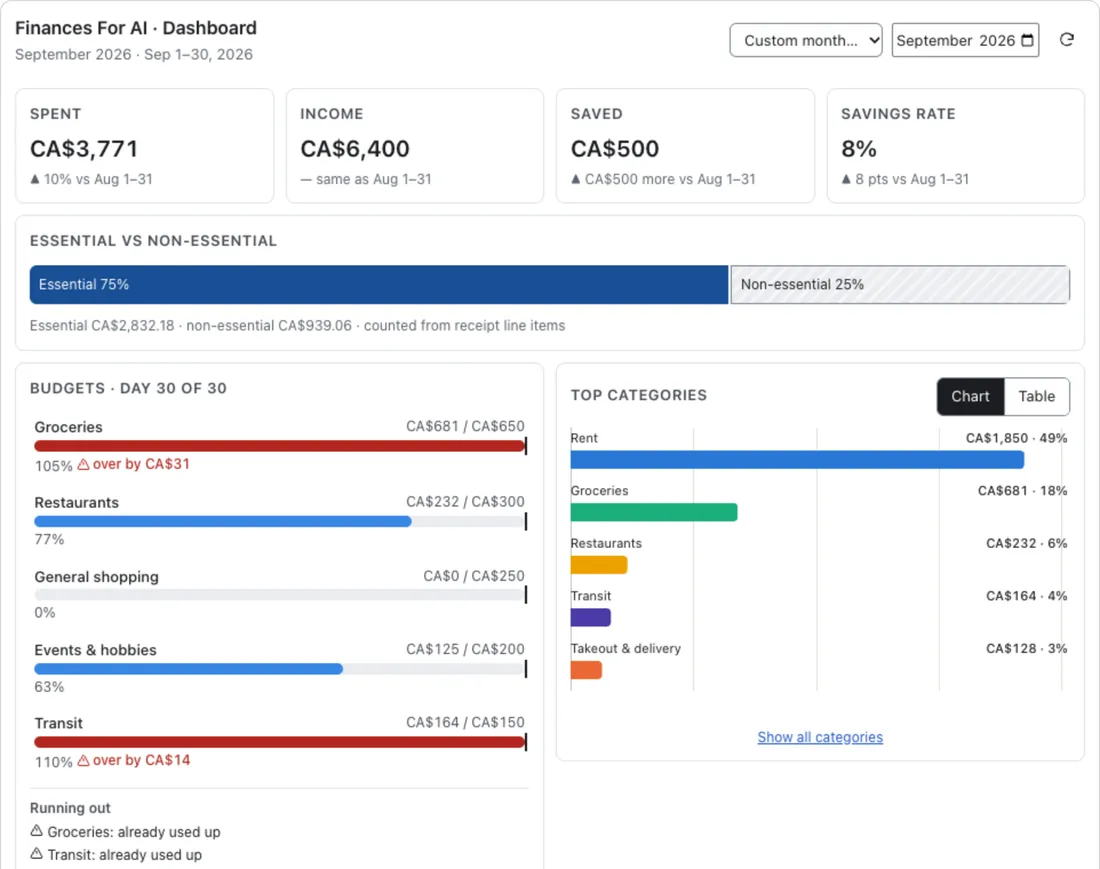
A monthly target per category or overall. Log a receipt and hear when a budget passes 80% or runs out. See the bars on the Dashboard.
Subscriptions and bills
Every renewal in one list with its next due date and monthly cost. Price changes are kept with their dates. Mark one paid at a different amount, pause, cancel or skip a month.
Net worth
Record your balances, and what you owe, when you check them. Net worth is assets minus debts, drawn over time with contributions and payments per period.
Goals
A target on a savings account, or a fund you add to. Each goal shows its progress, pace and projected date, and whether it's ahead, on track or behind the date you set.
Receipts and line items
Receipts become itemised transactions. Search by item (“did I buy batteries in March?”) and categorise single lines.
Essentials vs non-essentials
Each category is essential or not; override any purchase or line item. Ask “what did I spend on essentials this month?” and get the split.
Every receipt kept
Photos and PDFs, all pages, kept with the transaction and opened again from the chat. Export a period's receipts as a ZIP at tax time.
Income and savings rate
Log pay, side income and transfers to savings. The Dashboard shows income, spend and savings rate for the month.
Charts in the chat
Spending by month, by category or by merchant, the essential split, a net worth line. Each has a table view, and a click opens the transactions behind it.
Export, always
Everything as CSV or JSON, and receipt files as a ZIP, any time, on any plan.
Receipts by email
With Plus, forward emailed receipts to a private address. They wait in an inbox until you ask your assistant to record them.
Works with ChatGPT, Claude and other MCP assistants
One account, the same data everywhere. MCP is the open standard for connectors. AI assistants that support the MCP Apps protocol (including ChatGPT and Claude) show visual, interactive screens. Elsewhere the answers come as plain text.
Free forever for up to 1 GB of storage and 50 transactions a month. Plus is $24 a year. (Just $2 per month.)
Receipts
Every way a receipt gets in.
Every receipt you add is kept, photo or PDF, all pages, and opens again whenever you need it. Card numbers are removed from what is recorded. You can turn image storage off, or delete one receipt's files and keep the transaction.
No attachment button? Ask for an upload link and add the photo from your phone in one tap, or add it on the review screen. With Plus you can also forward emailed receipts to your own private address. They wait in an inbox until you ask your assistant to record them.
Crumpled, long, in another language: if your assistant can read it, Finances For AI can log it. It checks that the items add up to the total, flags anything that doesn't, and catches duplicates.
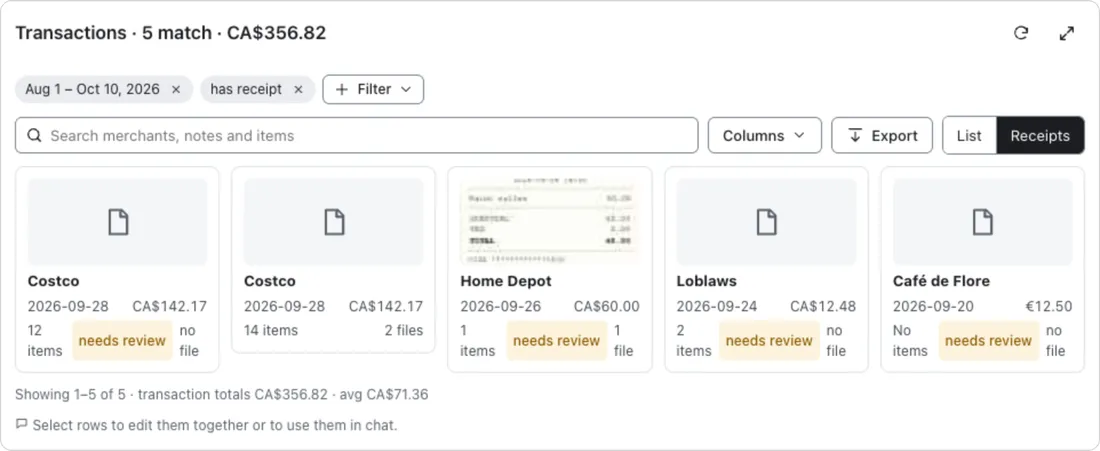
You: Show me my receipts since August
AssistantHere are the five receipts since 1 August. Four still need a look.
Screens
See it in your chat.
These are real screens from Finances For AI, with demo data.
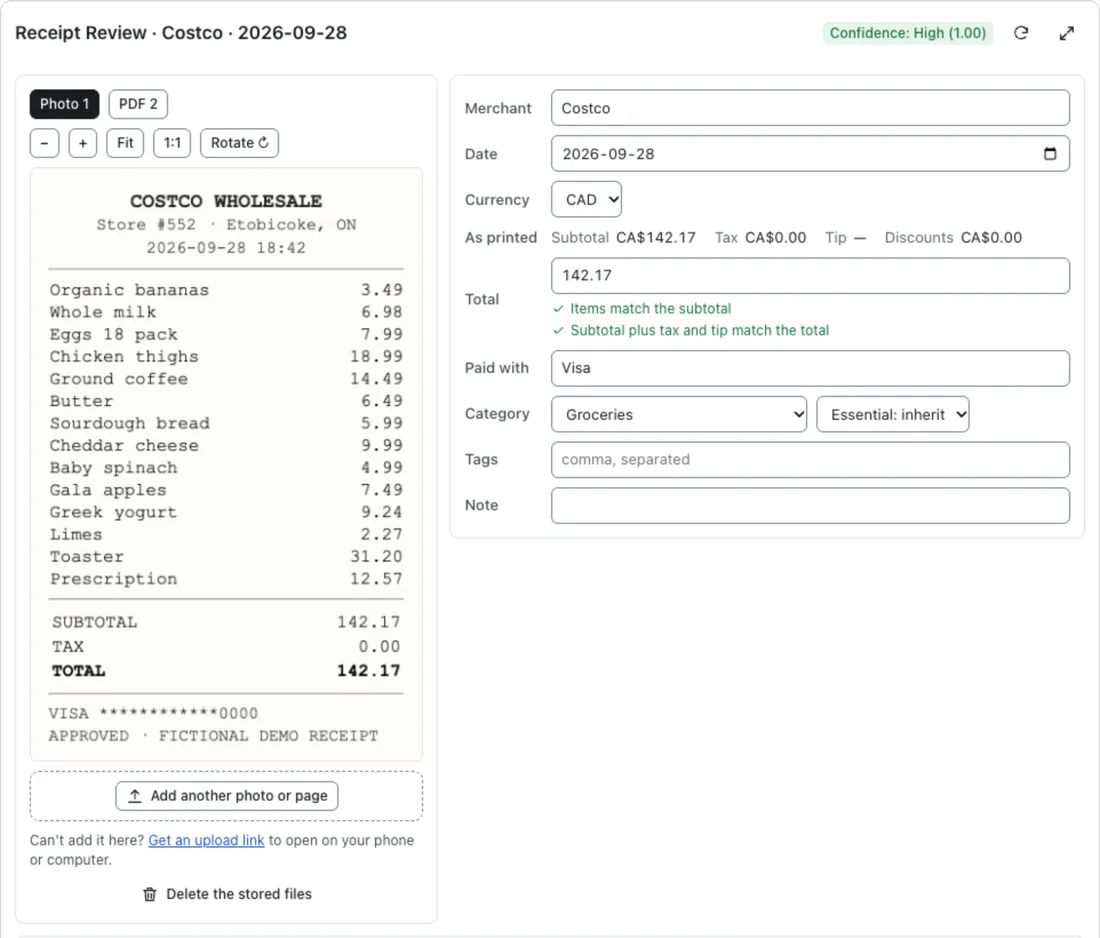
You: Here's my Costco receiptAttached: receipt photo
AssistantLogged: Costco, 28 September, CA$142.17, 14 items. Twelve are groceries (CA$98.40), the toaster is under Home & furniture and the prescription under Pharmacy. The items add up to the total. Check anything below, then confirm.
You: Show me my month so far
AssistantHere is September at a glance.
Also in the chat: Transactions, Recurring, Net Worth, Goals, Categories & tags, and a Setup Wizard for currency, categories and bills.
Examples
The everyday things people say.
The six questions it was built around are on the home page. These are the rest of your first week.
Here's my receipt. (with a photo)
Itemised, totalled and categorised, with the photo kept. Say "show it" and the Receipt Review screen opens so you can fix anything.I spent $42.17 at Costco on groceries.
Logged as an expense under Groceries. One line back confirming it.Add Netflix, $15.49 a month, renews on the 12th.
A recurring bill with its next due date and what it adds up to in a year.My savings account is at $8,240 as of today.
A balance recorded; net worth updated.I paid $400 on my Visa.
A payment logged against the card, not counted as spending; tell it the new balance and net worth follows.Set a $400 a month budget for takeout.
A budget you can check with “how am I doing on takeout?”, and a nudge as you log.Set a goal: $4,000 for a trip by next August.
A goal with its progress, pace and projected date. Add a contribution whenever you put money toward it.I want $4,000 for a trip by next August. What would get me there?
Your assistant checks the goal's pace against what you've been spending and suggests what it sees: where there's room, and what a monthly contribution would need to be.Looking at this month's purchases, where could I spend less?
Your assistant goes through your transactions by category and merchant and points out where there's room to cut.Go through my purchases and find lower-cost alternatives.
Your assistant reads your regular merchants and subscriptions and suggests cheaper options where it knows of one. Finances For AI supplies the record; the ideas are your assistant's.Export everything to CSV.
A download link for your transactions and their items. Receipt files export separately as a ZIP.
Finances For AI keeps the records. Your assistant reads the receipts and does the talking.
Free forever for up to 1 GB of storage and 50 transactions a month. Plus is $24 a year.