

“Best personal finance app” lists are written for people who open an app. This one is for people who open a chat: which record your assistant can reach, whether it can write as well as read, what you see in the chat, and what a year costs.
Six products: Finances For AI, Era, Monarch, YNAB, Copilot Money and Lunch Money. Every price and connector claim was checked on the vendor’s own site on 15 October 2026. Where we could not confirm something, we say so. Finances For AI is our product. The others get their strengths first. The verdict is by reader, not a single winner.
The context: ChatGPT’s own Finances
OpenAI added a Finances feature to ChatGPT in a preview from 15 May 2026, first for US Pro subscribers. Its release notes say it reached US users on Free, Go, Plus and Pro on 2 October 2026. It links bank accounts through Plaid and shows spending, bills, subscriptions, net worth and investments. OpenAI says it cannot move money or change your accounts. It is US only and lives inside ChatGPT, so it does nothing for a Claude user. It is the backdrop here, not a ranked product.
The table
“Connector made by the vendor” means the vendor itself runs a server your assistant connects to through the Model Context Protocol (MCP), the open standard both assistants use for connectors. Community-built servers exist for most of these products; they are not the vendor’s.
| Product | Connector made by the vendor | Read and write through the AI | Screens inside the chat | Receipt photo in the chat | Price a year, and the free tier | Where the data lives | Also good at |
|---|---|---|---|---|---|---|---|
| Finances For AI | ChatGPT and Claude, added by address | Read and write | Yes: nine screens | Yes, itemised, with a review screen | Free forever: 50 transactions a month. Plus: US$24 a year | One database per account on Cloudflare | Receipts itemised, line-item search, budgets that speak up |
| Era | Claude (listed in the directory) and ChatGPT by address | Read on Basic; read and write from Organize | Not that we could find | Not that we could find | Basic: free, two connected accounts. Organize: US$83.88 a year or US$9.99 a month | Bank sync through MX; hosting not stated | Bank sync, automation rules |
| Monarch | Paused since June 2026 | Paused; a community server writes | No | In the app only | Core: US$99.99 a year or US$14.99 a month. Plus: US$199.99 a year. Seven-day trial, no free plan | US-based AWS | Bank sync, investments, mobile apps |
| YNAB | A ChatGPT app for the method; it cannot see your plan | Through the API and a token: read and write | Articles and a calculator, not your data | In the app only | US$109 a year or US$14.99 a month. 34-day trial, no card, no free plan | United States (Heroku, AWS) | The envelope method, bank import |
| Copilot Money | Waitlisted beta, read-only | Read only (beta) | Could not confirm | Not found | US$95 a year or US$13 a month. One-month trial with a card, no free plan | Google Cloud | Design, investments, iPhone and Mac |
| Lunch Money | No; a public API and community servers | Through the API: read and write | No | In the app only | US$10 a month, or a yearly price you set, US$60 minimum. 30-day trial, no card | Could not confirm; Plaid for sync | Open API, multi-currency, Android |
Finances For AI
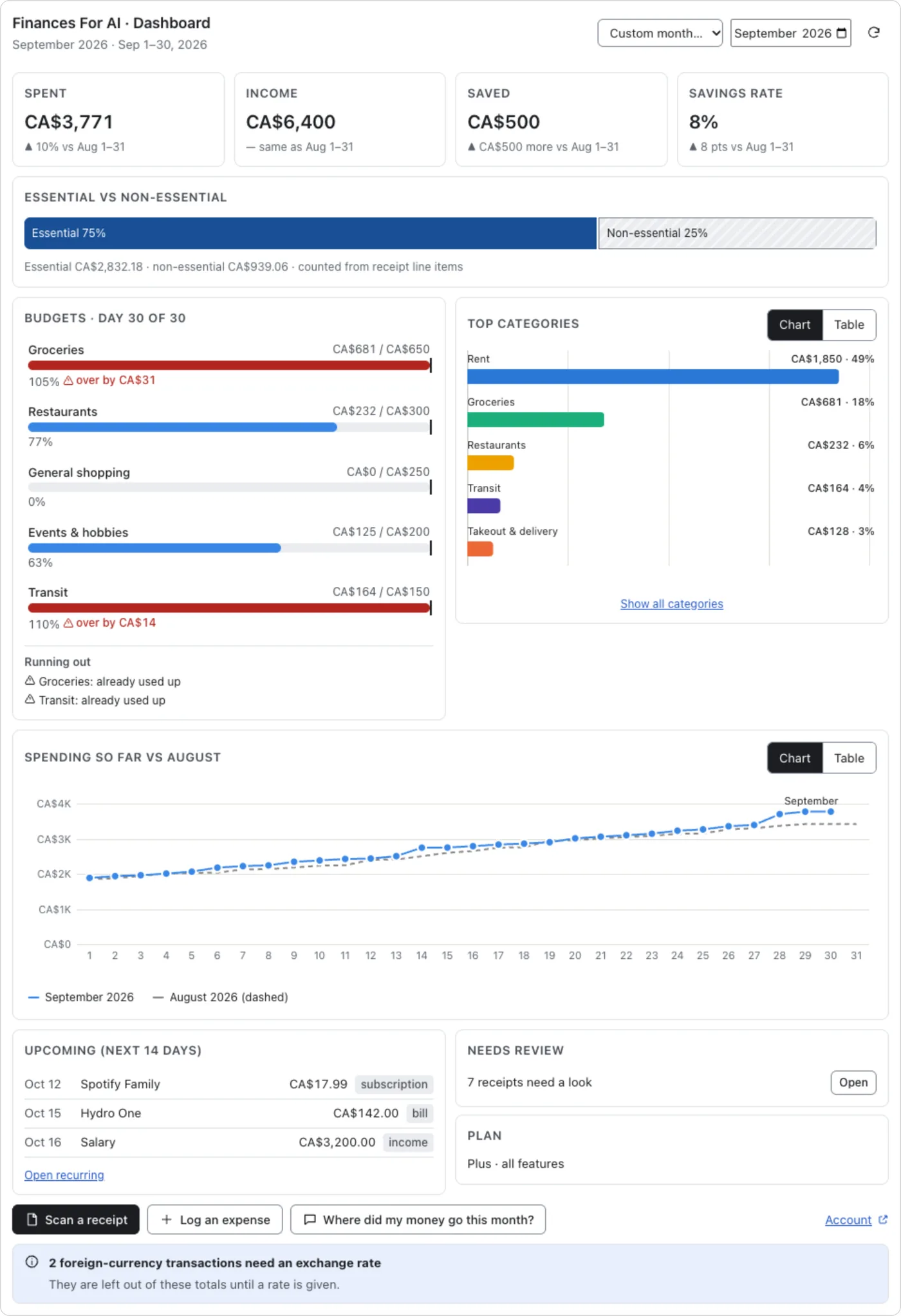
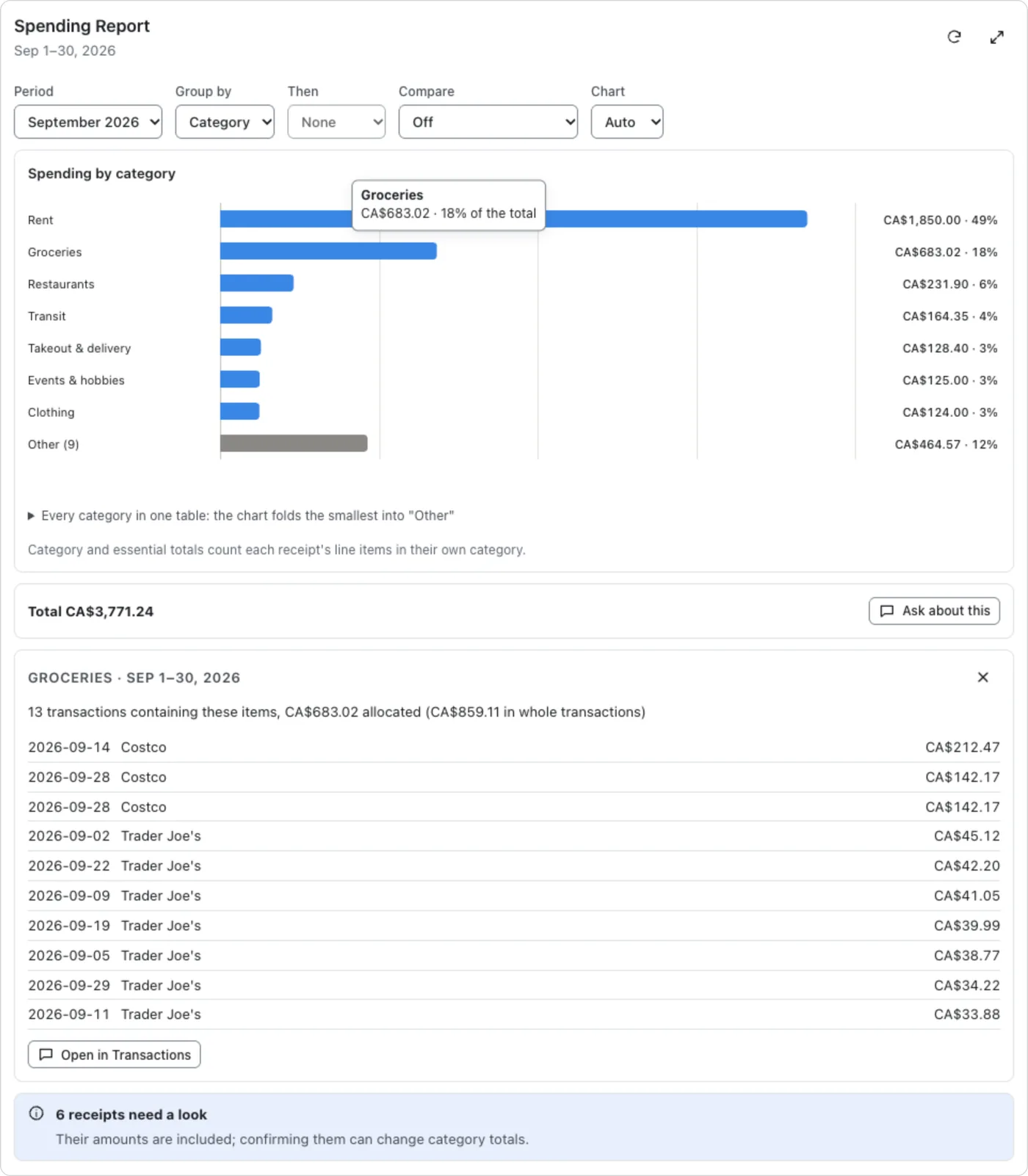
The only product of the six built from the first line to live inside the chat. A sentence is an entry (“I spent $42 at Costco”) and a photo is an itemised receipt. Answers come as screens: Dashboard, Spending Report with drill-downs, Transactions, Receipt Review, Recurring, Net Worth, Goals, Categories and tags, and a Setup Wizard. Budgets speak up as you log, at 80% and when one runs out.
The honest cost: Finances For AI does not connect to a bank, card or brokerage. Every record comes from you, by sentence, receipt or a balance you read off. No automatic sync, no CSV import, one account per person. (We’re considering adding bank account sync. If you’d like it, ask your assistant to log the feature request.)
Free is forever, not a trial: 50 logged transactions a calendar month, every screen, export always. Plus is US$24 a year, plus applicable taxes, for unlimited transactions, 20 GB of receipt files and receipts by email, with a 30-day money-back guarantee. (Just $2 per month.)
Era
Era is the closest product in intent, and it has the thing we do not: bank sync through MX and other aggregators. Era’s connector is listed in Anthropic’s Claude connector directory (May 2026), and Era’s own guide adds the same server to ChatGPT by address. On the free Basic plan the assistant reads only. Read and write, including automation rules, starts on Organize, with tools that create and update transactions, manage categories, tags and rules, and import a CSV. Era says connecting an assistant does not give it permission to move money.
We could not find a screen that renders in the chat (answers are text) or receipt photos. Basic is free with no card, limited to two connected and two manual accounts and 100 tool calls a day. Organize is US$83.88 a year, shown as US$6.99 a month, or US$9.99 billed monthly. Paid plans start with a trial or a paid intro that takes a card up front.
Monarch
Monarch is the full-service choice: bank sync through Plaid, Finicity and MX, investment tracking, iOS, Android and web, receipts attached to transactions with email forwarding and scanning, an in-app AI assistant, insights and a weekly recap. Years of polish, in the US and Canada.
Monarch published a connector of its own, then paused it. Its help centre says a data provider asked it to pause while a question about data portability is worked through. Until it returns, the routes are a CSV export on web (Monarch’s own page suggests uploading it to a model of your choice) or a community server such as robcerda/monarch-mcp-server, which reads and writes and is not Monarch’s. Nothing renders in the chat. Monarch’s in-app AI uses third-party models (its help centre names OpenAI, Anthropic and Google) and says they do not retain the data or train on it.
Core is US$99.99 a year or US$14.99 a month; Plus is US$199.99 a year, billed annually; a seven-day trial billed when it ends; no free plan.
YNAB
YNAB is a method as much as an app: give every dollar a job, in envelopes, with bank import through Plaid or MX and a loyal community. Web, iOS and Android; a 34-day trial with no card; photos on transactions.
YNAB has two very different AI things. A YNAB app inside ChatGPT, built by YNAB and invoked with @ynab, teaches the method, opens YNAB articles in the chat and pops up a debt payoff calculator. It cannot read your transactions, balances or categories. And YNAB’s public API, with personal access tokens from Developer Settings, writes transactions, scheduled transactions, accounts, categories, assigned amounts and payees. Community servers such as calebl/ynab-mcp-server use that token to read and write. YNAB lists some on its API page and says they are not affiliated with YNAB. Nothing of yours renders in the chat.
US$109 a year, shown as US$9.08 a month, or US$14.99 a month, plus tax; no free plan. Data is stored in the United States, on Heroku and AWS.
Copilot Money
Copilot is the design-led one: Plaid sync (with Mastercard, MX and Akoya where Plaid does not reach), investments with intraday updates, categorisation by its own Copilot Intelligence, and apps for web, iPhone, iPad and Mac. No Android app. Its Money Assistant, in beta behind a waitlist, creates, updates and deletes categories, budgets, transactions and recurring items with your approval. It shows charts inside Copilot’s own conversation.
For ChatGPT and Claude, Copilot announced its own server in a beta on 15 May 2026: read-only to start and, in Copilot’s words, tested for Claude, ChatGPT and Codex CLI. It is behind the same waitlist, with no public address that we found. We could not confirm whether anything renders in the chat. Community servers read the Mac app’s local cache; they are not Copilot’s. We found no receipt attachments.
US$95 billed yearly, shown as US$7.92 a month, or US$13 a month; a one-month trial that needs a card; no free plan. Infrastructure on Google Cloud; no region given.
Lunch Money
Lunch Money is the open one: web-first, multi-currency, Plaid sync for US, Canadian and some EU banks, a companion app on iOS and Android, and attachments on transactions. Its public API (v2, which the help centre still labels an open beta) uses tokens you issue yourself. The API reads and writes nearly everything; Plaid-synced accounts are read-only through it.
Lunch Money has no server of its own and no in-app AI. Its “using with AI” page points to community servers, names lunchmoney-mcp as a popular choice, and warns that your data may be sent through the AI provider. Answers are text only.
US$10 a month, or an annual pay-what-you-want price whose minimum rose to US$60 on 15 March 2026. The pricing page puts the annual price on a slider from US$60 to US$150. A 30-day trial with no card; no free plan. We could not read the privacy page, so where the data lives is unconfirmed.
Where Finances For AI clearly wins
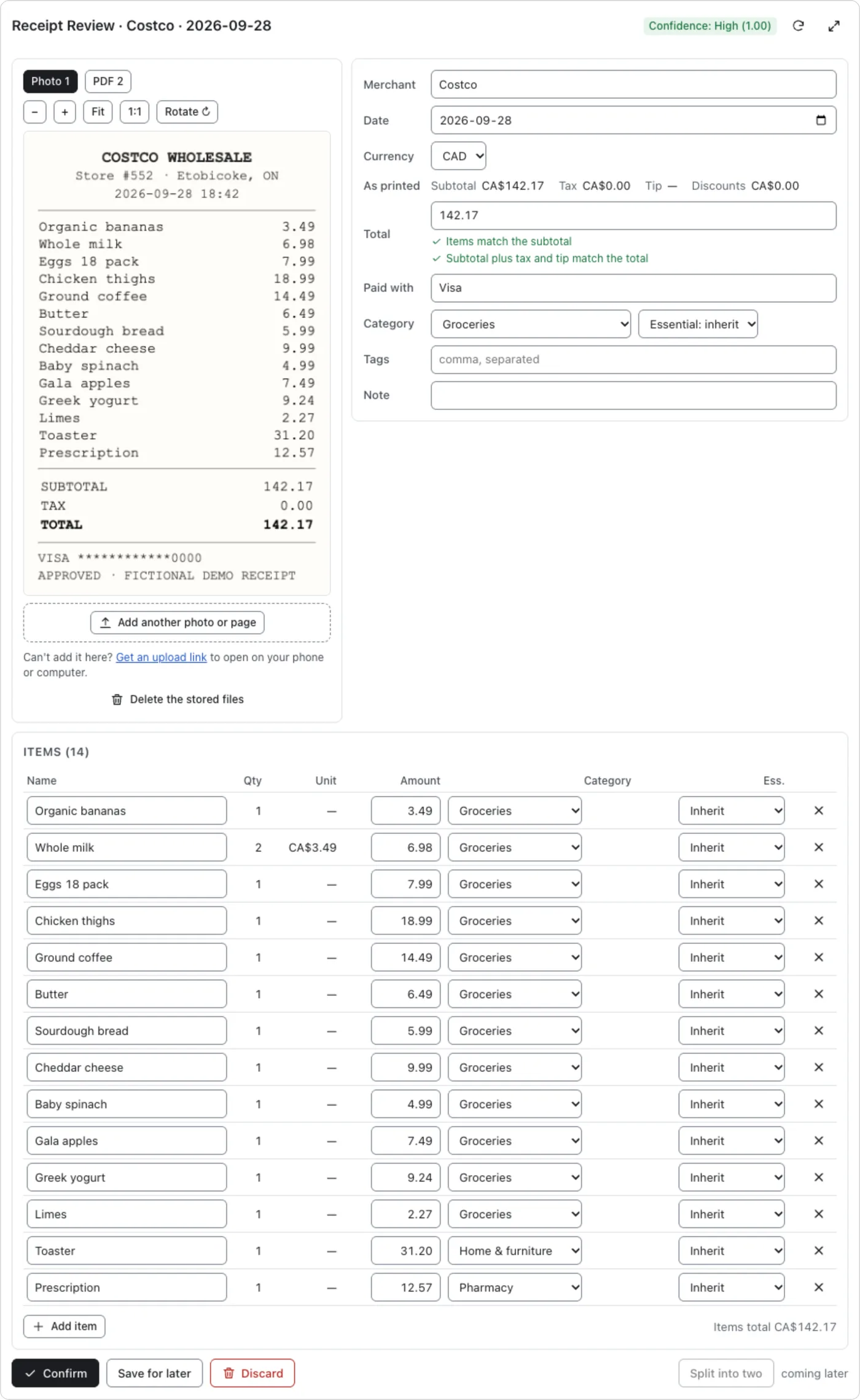
Screens in the chat. Only Finances For AI renders interactive screens inside AI assistants that support the MCP Apps protocol (including ChatGPT and Claude): tables, charts with drill-downs, a receipt review with the photo beside the fields, drawers for editing. Everyone else is text, paused, waitlisted or unconfirmed.
Price. Plus is US$24 a year. Paid plans elsewhere run from US$60 (Lunch Money’s annual minimum) through US$83.88 (Era), US$95 (Copilot), US$99.99 (Monarch Core) and US$109 (YNAB) to US$199.99 (Monarch Plus). You pay for the record, not for an AI, because the assistant you already pay for does the reading.
A free plan with no clock. Free is forever: 50 transactions a month. Era’s Basic is also free; the other four are trials.
Receipts from a photo. Drop a receipt into the chat and it comes back itemised, checked and categorised, with a review screen. Monarch, YNAB and Lunch Money attach photos inside their apps, not in the chat.
Finances For AI holds no bank credentials because it does not connect to a bank. That is how it works, not a prize. The price is that nothing syncs.
The verdict, by reader
Pick Monarch for the complete app: many accounts synced, investments, mobile apps. When its connector returns, it may change this list.
Pick Era for bank sync with a vendor-run connector in Claude or ChatGPT today, if text answers suit you.
Pick YNAB for the envelope method and its community; add a community server on its API if you also want Claude to read and write your plan.
Pick Copilot if you live on iPhone and Mac and want the best-looking app; join the waitlist for its read-only connector.
Pick Lunch Money if you want your data open, an API you control, multi-currency and a price you set.
Pick Finances For AI if you would rather keep the record in the assistant you already talk to, want receipts itemised from a photo and the charts in the chat, not in another tab, and want to pay US$24 a year, or nothing. If a bank feed is the thing you can’t live without, one of the other five is the better fit.