

Copilot Money and Finances For AI both put “AI” near the front of what they do, and mean nearly opposite things by it. Copilot brings AI into its own app: categorisation that learns, and a Money Assistant in beta that edits your data with your approval, inside Copilot. Finances For AI brings your data into the AI you already use. It is a record that ChatGPT or Claude reads and writes, with the screens in the chat. This comparison is about which direction suits you.
Copilot’s strengths first. Every price and feature claim was checked on Copilot’s own site on 15 October 2026. Where we could not confirm something, we say so. Copilot Money is Copilot’s trademark.
What Copilot does well
Design, above all; Copilot is the budgeting app people show to friends. Bank sync through Plaid, with Mastercard, MX and Akoya where Plaid does not reach, and direct links to a few services. Investment tracking with intraday updates and market index benchmarks. Copilot Intelligence, which learns your spending and categorises every transaction on its own. Apps for web, iPhone, iPad and Mac. And the Money Assistant, in beta behind a waitlist. Copilot says it can create, update and delete categories, budgets, transactions, recurring items and rules, with nothing happening without your say-so, and that it shows charts in its own conversation. A no-account demo lets you try the app before connecting anything.
What it does not have: an Android app. Copilot has mentioned Android efforts in the past, but as of our check there is no app and no date.
1. How does your AI reach it?
Copilot: on 15 May 2026 Copilot announced a server of its own for the Model Context Protocol (MCP), the open standard both assistants use for connectors. It is “now available in beta”, read-only to start, and in Copilot’s words tested for Claude, ChatGPT and Codex CLI. It is behind a waitlist shared with the Money Assistant, and we found no public address or setup page. Copilot’s August 2026 note says the server can reference categories, transactions, monthly spend and income, recurring items and tags. Otherwise there is a CSV export of all transactions, on iOS, iPadOS, macOS and web. Community-built servers read the Mac app’s local cache; those say plainly that they are not affiliated with Copilot, and they need the Mac app installed.
Finances For AI: a remote server you add by address in ChatGPT or Claude; the add page has the steps. Sign in with a one-time code by email, and one account serves both assistants. Nothing to install.
2. Can the AI write as well as read?
Copilot: through its own connector, no, not yet; Copilot says read-only to start. Writing happens inside Copilot, through the Money Assistant, where it is done well. The assistant proposes, you approve. The community servers write through an undocumented API, outside Copilot’s support.
Finances For AI: read and write on both plans, by saying it. “I spent $42 at Costco” logs a purchase. “Add Spotify, $17.99 a month” adds a subscription. “My savings account is at $8,240 as of today” records a balance and updates net worth. “Here’s my receipt” with a photo logs an itemised transaction after a review screen. On the screens, drawers and selected rows edit in place.
3. What do you see in the chat?
Copilot: inside Copilot’s own conversation, charts, per Copilot’s beta announcement. Inside ChatGPT or Claude, through the beta connector, we could not confirm anything beyond text, and the connector is read-only. Copilot’s charts live where Copilot lives.
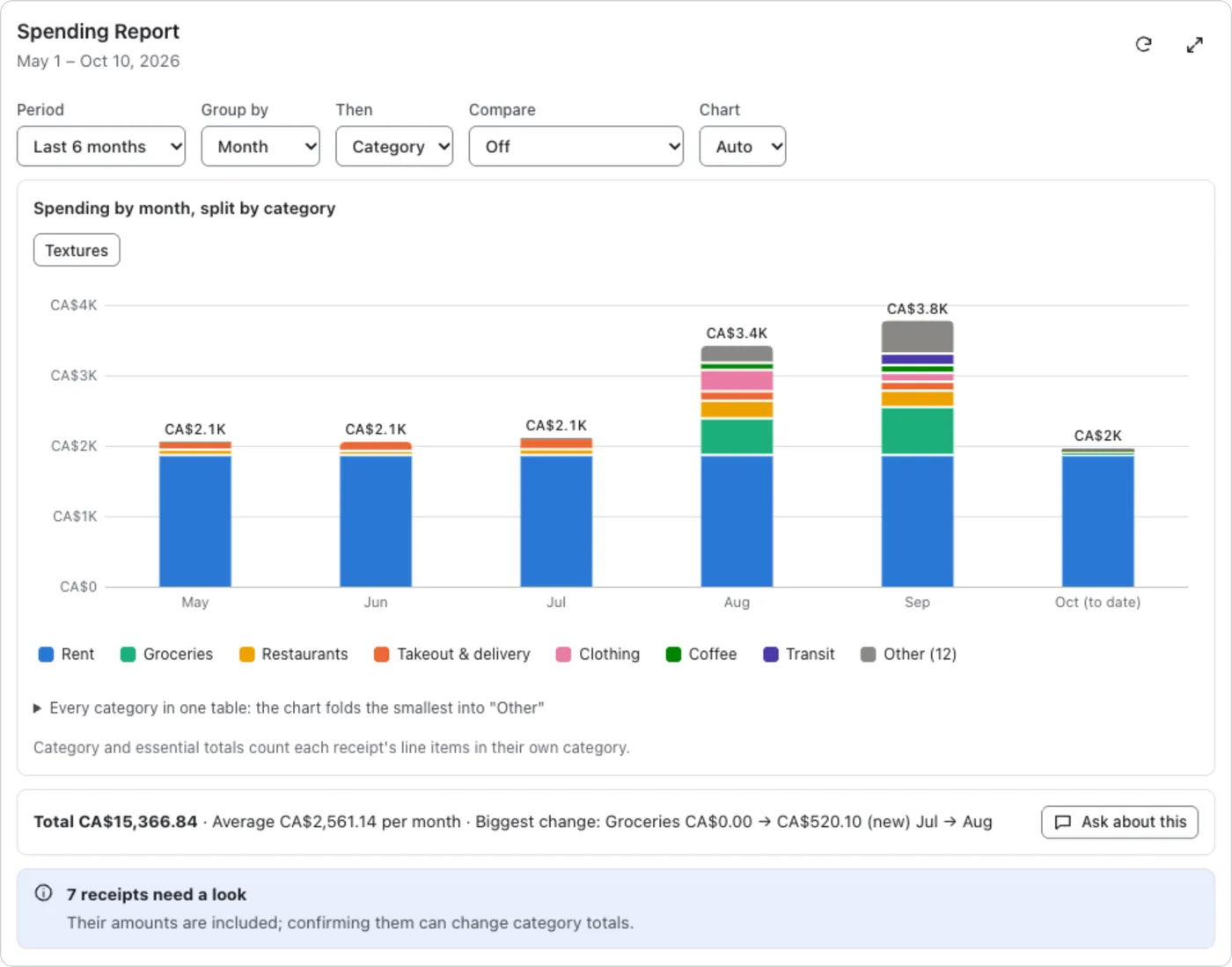
Finances For AI: nine visual, interactive screens, shown inside the chat by AI assistants that support the MCP Apps protocol (including ChatGPT and Claude). The Spending Report is the chart you ask for by name. It has a table view, a comparison with the previous period, a pie, and a drill-down from any bar to the transactions behind it.
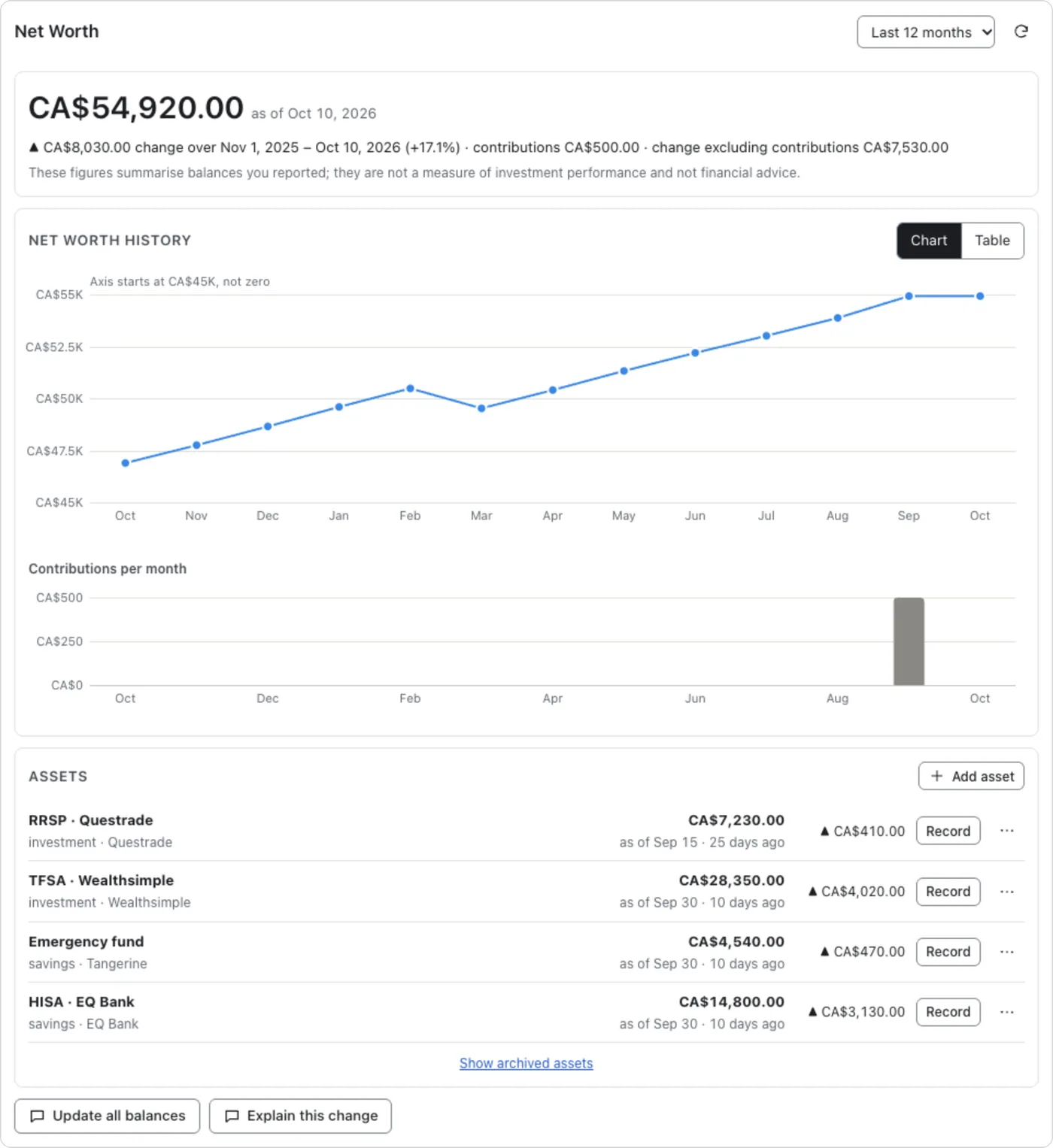
Net Worth is the screen Copilot’s investment tracking most invites a comparison with, so it is worth being plain. Finances For AI records the balances you report and draws the line. It has no market data, no holdings and no intraday anything. Its own footnote says these figures summarise balances you reported and are not a measure of investment performance. Copilot’s investment view is a different and richer thing.
4. What does it cost per year, and what does the free tier hold?
Copilot, as quoted on copilot.money/pricing on 15 October 2026, in US dollars: US$95 billed yearly, shown as US$7.92 a month, or US$13 a month. There are no named tiers. A one-month trial for new users, which Copilot’s terms say requires a card or another payment method. No free plan; the no-account demo is a look at the app, not a plan.
Finances For AI: Free is forever, not a trial. 50 logged transactions a calendar month, every screen and report, 1 GB of receipt files, two active goals, export always. Plus is US$24 a year plus applicable taxes: unlimited transactions, unlimited goals, 20 GB of files, receipts by email, cancel any time, and a 30-day money-back guarantee on the first year’s payment. (Just $2 per month.) The plans page has the detail.
A year of Copilot is about four years of Plus. Copilot’s price buys aggregators, market data, native apps and a team. Finances For AI’s buys the record, because your assistant does the reading and there is no aggregator.
5. Where does the data live, and what does the AI provider see?
Copilot: its privacy and security page says its infrastructure is built on the Google Cloud Platform, without naming a region, and that it does not advertise based on or sell financial information. The page says nothing about whether data goes to an AI model provider for Copilot Intelligence or the Money Assistant. No provider is named anywhere we looked, so we cannot say.
Finances For AI: one database per account, hosted on Cloudflare, encrypted in transit and at rest. It holds what you log and the receipt files you add, unless you turn image storage off. Card and account numbers are removed from what a receipt records. It holds no bank credentials because it does not connect to a bank; that is how it works, and the cost is that nothing syncs. (We’re considering adding bank account sync. If you’d like it, ask your assistant to log the feature request.) Export is CSV, JSON and a ZIP of receipt files, any time, on any plan. Finances For AI runs no model of its own. The AI provider sees the conversation, what you type and what the connector returns, under ChatGPT’s or Claude’s own data controls.
Recurring, where the two are closest
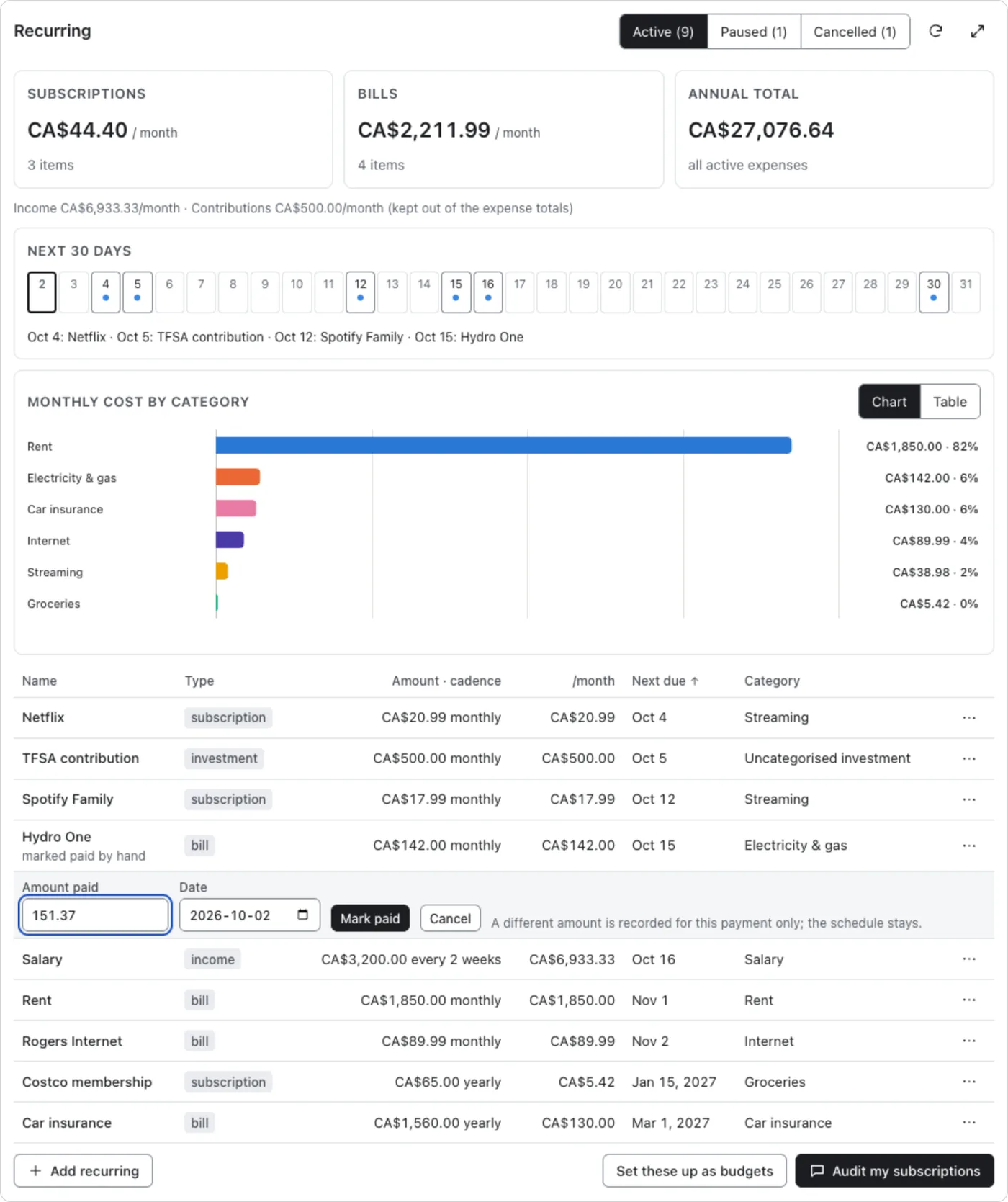
Both products treat subscriptions as first-class. Copilot’s Money Assistant can create and edit recurring items inside Copilot. Finances For AI’s Recurring screen, inside the chat, lists every subscription and bill with cadence, monthly equivalent and next due date. It keeps price changes with their dates, and lets you mark one paid at a different amount without changing the schedule.
Receipts are the other daily difference. We found no receipt attachment in Copilot’s help centre; its export fields include notes only. Finances For AI starts from the receipt photo and makes it an itemised transaction, with the review screen in the chat.
Who should pick which
Pick Copilot if you live on iPhone and Mac, want your accounts and investments synced into the best-looking app in the category, and like the idea of an assistant inside the app that edits with your approval. Join the waitlist if you want its connector in Claude or ChatGPT. It is read-only for now, and this article will change when that does.
Pick Finances For AI if you are on Android, or on anything, and want the record inside the assistant you already use; if you would rather say what you spent or show the receipt than sync a bank; if you want the chart in the chat and not in another app; and if US$24 a year, or nothing, is the price. If synced investments or the native app are what you are buying, Copilot is the better fit.
Copilot asks you to open the app and bring the AI in. Finances For AI asks you to open the chat and bring the numbers in. Pick the door you already use.