
Era and Finances For AI are the two products in this space that were built for an AI assistant first, rather than adding an assistant to an app. They answer the same question, “how do I put my money in front of Claude?”, in two different ways. Era syncs your bank accounts and hands the assistant a connector to the synced data. Finances For AI keeps a record you fill by sentence and by receipt. It hands the assistant screens as well as data.
Both are described here with their strengths first. Every price and feature claim was checked on Era’s own site on 15 October 2026. Where we could not confirm something, we say so. Era is Era’s trademark; the names are used to tell the products apart.
What Era does well
Era connects to your accounts through MX and other regulated aggregators, so the assistant sees balances and transactions you never typed. The free Basic plan takes two connected and two manual accounts; Organize takes fifteen, Automate a hundred. On the paid plans there is a rules engine, and the assistant can manage automation rules on your behalf. Era’s connector is listed in Anthropic’s Claude connector directory, under Tinwell Labs Inc, DBA Era, dated May 2026. Era’s own announcement calls it the first personal finance connector there. Era’s guides also add the same server to ChatGPT by address, for ChatGPT plans that support it. Connections use OAuth 2.1 with scopes shown at approval. Era’s home page says plainly that connecting an assistant does not give it permission to move money. If you want many accounts synced and read by Claude today, Era is the product that does it.
1. How does your AI reach it?
Era: a remote server at context.era.app, reached through the Model Context Protocol (MCP), the open standard both assistants use for connectors. In Claude it is in the directory; in ChatGPT, Era’s guide has you add the server by its address. Era’s docs describe dozens of tools in nine groups (the counts differ between Era’s pages, so we give no fixed number).
Finances For AI: also a remote server, at an address you paste into ChatGPT (Plugins, Add custom MCP server) or Claude (Connectors, Add custom connector). The add page has the steps. Sign in with a one-time code sent to your email. One account serves both assistants.
2. Can the AI write as well as read?
Era: on Basic, read only. From Organize, read and write. Era’s docs list tools that create manual transactions, update transactions, manage categories, tags and automation rules, and import a CSV. Era’s Context page says agents can schedule transfers between your own accounts, each needing your approval. We found no budget tool in the docs.
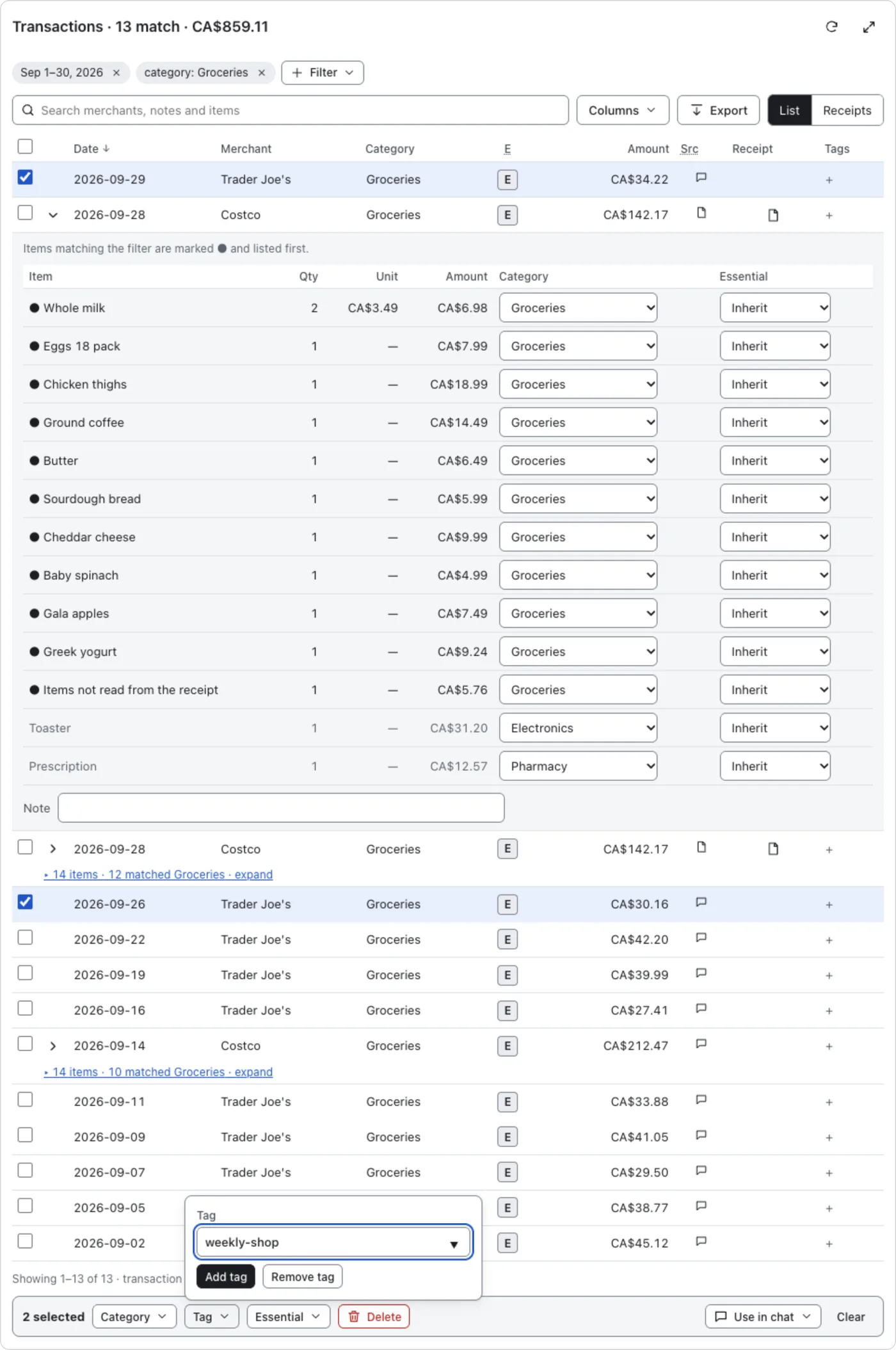
Finances For AI: read and write on both plans. Writing is the point. “I spent $42 at Costco” is a complete entry; so is a photo of a receipt, which comes back itemised with every line categorised. Budgets, goals, subscriptions and balances are all set by saying them. Editing happens in the chat too. Select rows on the Transactions screen and change their category, tag or essential flag together, or tell your assistant to.
3. What do you see in the chat?
Era: text. We looked through Era’s docs, pricing page and guides and found no screen that renders inside Claude or ChatGPT. The only interface tool described shows a question form. Era’s answers are the assistant’s words over the connector’s data. We could not confirm anything more, so if Era adds screens this will be updated.
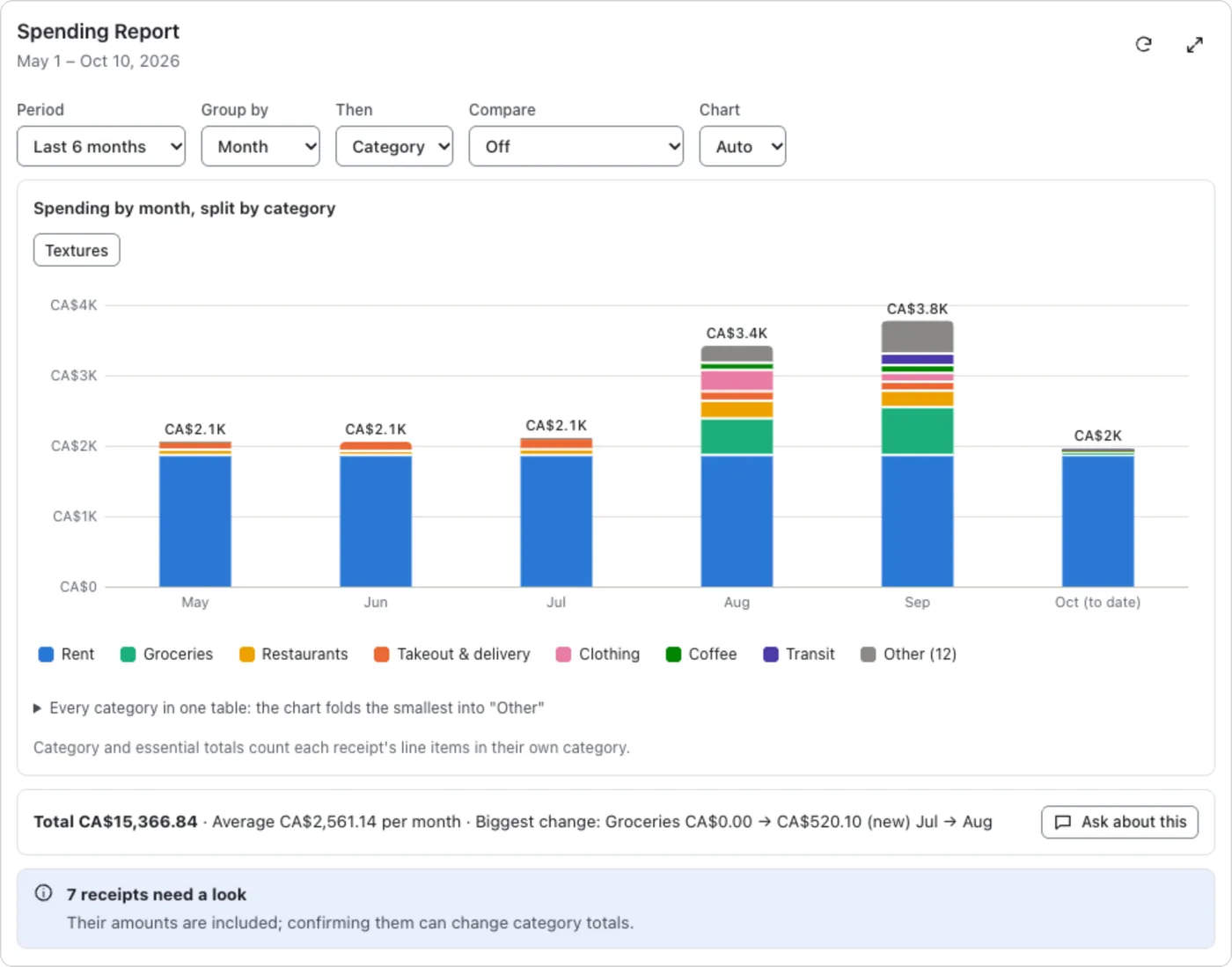
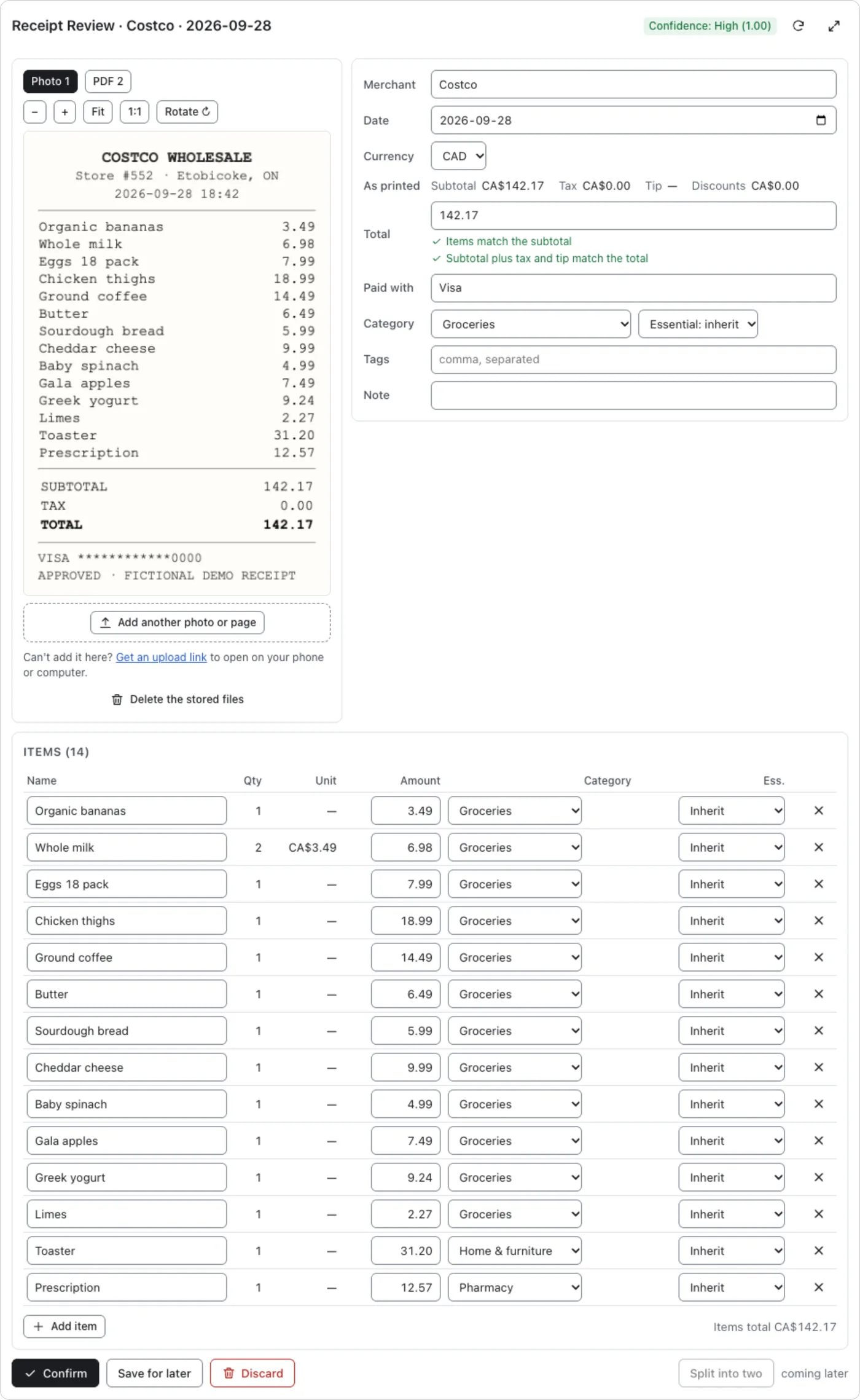
Finances For AI: nine visual, interactive screens, shown inside the chat by AI assistants that support the MCP Apps protocol (including ChatGPT and Claude). Dashboard, Spending Report, Transactions, Receipt Review, Recurring, Net Worth, Goals, Categories and tags, and the Setup Wizard. Charts have a table view and a drill-down. The receipt review shows the photo beside the fields. Elsewhere the same answers come as plain text.
4. What does it cost per year, and what does the free tier hold?
Era, as quoted on era.app/pricing on 15 October 2026, in US dollars: Basic is free with no card, with two connected and two manual accounts, 100 MCP tool calls a day and balances refreshed every day or two. Organize is US$83.88 a year, shown as US$6.99 a month, or US$9.99 billed monthly, with fifteen connected accounts, 250 tool calls a day and daily sync. Automate is US$209.88 a year (US$24.99 monthly), with 1,000 tool calls a day. Operate is US$839.88 a year per seat (US$99.99 monthly). Paid plans begin with a trial or a paid intro that takes a card up front and continues as a paid plan unless cancelled. Add-ons such as extra MCP calls (US$33.48 a year) and unlimited accounts (US$41.88 a year) are sold separately.
Finances For AI: Free is forever, not a trial. 50 logged transactions a calendar month, every screen and report, 1 GB of receipt files, two active goals, export always. Plus is US$24 a year plus applicable taxes: unlimited transactions, unlimited goals, 20 GB of files, receipts by email, cancel any time, and a 30-day money-back guarantee on the first year’s payment. (Just $2 per month.) The plans page has the detail.
One year of Era’s Organize costs about three and a half years of Plus. The reason is structural, not a discount. You pay Finances For AI for the record only, because the assistant you already pay for does the reading, and there is no bank aggregator to pay.
5. Where does the data live, and what does the AI provider see?
Era: Era’s security article says bank connections go through MX, data is encrypted with AES-256 at rest and TLS 1.3 in transit, and “your data never trains AI models”. Era says the agent sees structured financial summaries, and that revoking an agent’s access does not erase information already shared with it. We could not find where Era’s servers are hosted, so we say nothing about that.
Finances For AI: one database per account, hosted on Cloudflare, encrypted in transit and at rest. It holds what you log: transactions and items, balances, budgets, subscriptions, receipt files unless you turn image storage off, and the email you sign in with. Card and account numbers are removed from what a receipt records. It holds no bank credentials, because it does not connect to a bank; that is how it works, and the cost of it is that nothing syncs. (We’re considering adding bank account sync. If you’d like it, ask your assistant to log the feature request.) Export is CSV, JSON and a ZIP of receipt files, any time, on any plan.
In both products, what the AI provider sees is the conversation: what you type and what the connector returns. That belongs to ChatGPT or Claude under their own data controls. Finances For AI runs no model of its own and never uses your records for training or ads.
The receipt, since it is the biggest difference in daily use
Era’s model is that the data arrives from the bank and the assistant explains it. Finances For AI’s model is that the data arrives from you, and the fastest way to give it is a photo. Say “Here’s my receipt” with the photo attached. Your assistant reads the merchant, date, items, tax and total. Finances For AI checks the maths, catches duplicates, suggests a category per line and opens the review screen. We found no receipt feature in Era’s documentation.
Who should pick which
Pick Era if the thing you want is your real accounts, synced and read by Claude, with rules that run on their own; if you have more than a couple of accounts; and if text answers from the assistant are enough. The free Basic plan is a fair way to find out. Organize at US$83.88 a year is cheaper than most full budgeting apps.
Pick Finances For AI if you would rather tell your assistant what you spent, or show it the receipt, than hand over bank logins; if you want the chart or the table in the chat rather than described to you; if receipts itemised by line matter to you; and if US$24 a year, or nothing, is the price you had in mind. Try it with three sentences: “I spent $42 at Costco”, “Set a $500 budget for groceries”, “How am I doing this month?”
Both are young products built for the same future. Pick by how you want the data to arrive.