
OpenAI added Finances to ChatGPT on 15 May 2026, first as a preview for Pro subscribers in the United States. Since 2 October 2026 it is on every consumer plan there, Free included. Link your accounts through Plaid and ChatGPT reads the balances, the transactions, the investments and the debts, builds a dashboard, and answers questions from it. Finances For AI is a different shape of thing. It is a record your assistant keeps, filled by sentence and by receipt, that works from ChatGPT, from Claude and from any other assistant that supports the Model Context Protocol (MCP), the open standard both assistants use for connectors.
ChatGPT’s strengths first. Every claim here was read from OpenAI’s announcement, its help centre, its release notes and its pricing page on 5 November 2026. Where something could not be confirmed, we say so. ChatGPT is OpenAI’s trademark.
What Finances in ChatGPT does well
The breadth of the feed. Plaid connects more than 12,000 institutions, and ChatGPT reads balances, transactions, investments and liabilities from all of them, without ever seeing a full account number. It cannot move money, pay a bill or trade. The dashboard has spend by category, subscriptions with their cadence and next charge date, bills and upcoming payments, net worth over time, a portfolio view and a market update, and since September a credit score and report from Experian on Plus and Pro. Goals, obligations and accounts you cannot link are kept as financial memories you can read and delete. Ask it to reclassify a transaction and it remembers. There are weekly insight updates, voice, and apps for web, iOS and Android. Six months in, it is the most complete bank-fed assistant feature there is, and on a Free plan it costs nothing.
1. How does your AI reach it?
Finances in ChatGPT: it is a part of ChatGPT. A Finances entry sits in the sidebar, and in a chat you call it with @Finances. That is also the whole of where it works. Nothing in OpenAI’s material describes an API, a connector or an export of the synced data, so Claude, or any other assistant, cannot see it.
Finances For AI: a remote server you add by address in ChatGPT or in Claude; the add page has the steps. Sign in with a one-time code sent to your email, and one account serves every assistant you add it to. Ask ChatGPT in the morning and Claude at night; both read the same record. Finances For AI runs no model of its own and is not tied to any AI provider. If you change assistants next year, the record comes with you.
2. Can the AI write as well as read?
Finances in ChatGPT: mostly it reads. The record is what the bank sends, categorised by ChatGPT, and you can correct a category in the chat. Accounts you cannot link can be described by hand, and goals and targets live in memory. Budgets are conversational: OpenAI’s help centre says it can help plan a budget, and we found no budget you set once that then watches your spending. A cash purchase, a split bill or a receipt is not a transaction unless a bank saw it.
Finances For AI: read and write, on both plans, by saying it. “I spent $42 at Costco” is a purchase. “Set a $500 a month budget for groceries” is a budget, and from then on your assistant tells you when it passes 80% and when it runs out. “Here’s my receipt” with a photo is an itemised transaction after a review screen. Cash, cards, a second currency on holiday: if you can say it or photograph it, it is in the record. Editing happens in the chat too. Select rows on the Transactions screen and change their category or tag together, or tell your assistant to.
3. What do you see in the chat?
Finances in ChatGPT: a real dashboard, on the Finances page and in answers, with the widgets listed above. It is one of the better-built interfaces in ChatGPT. OpenAI’s help centre warns that a breakdown can be off when a transfer, a card payment or a duplicate pending charge is counted as spending, and that some institutions send balances without transactions.
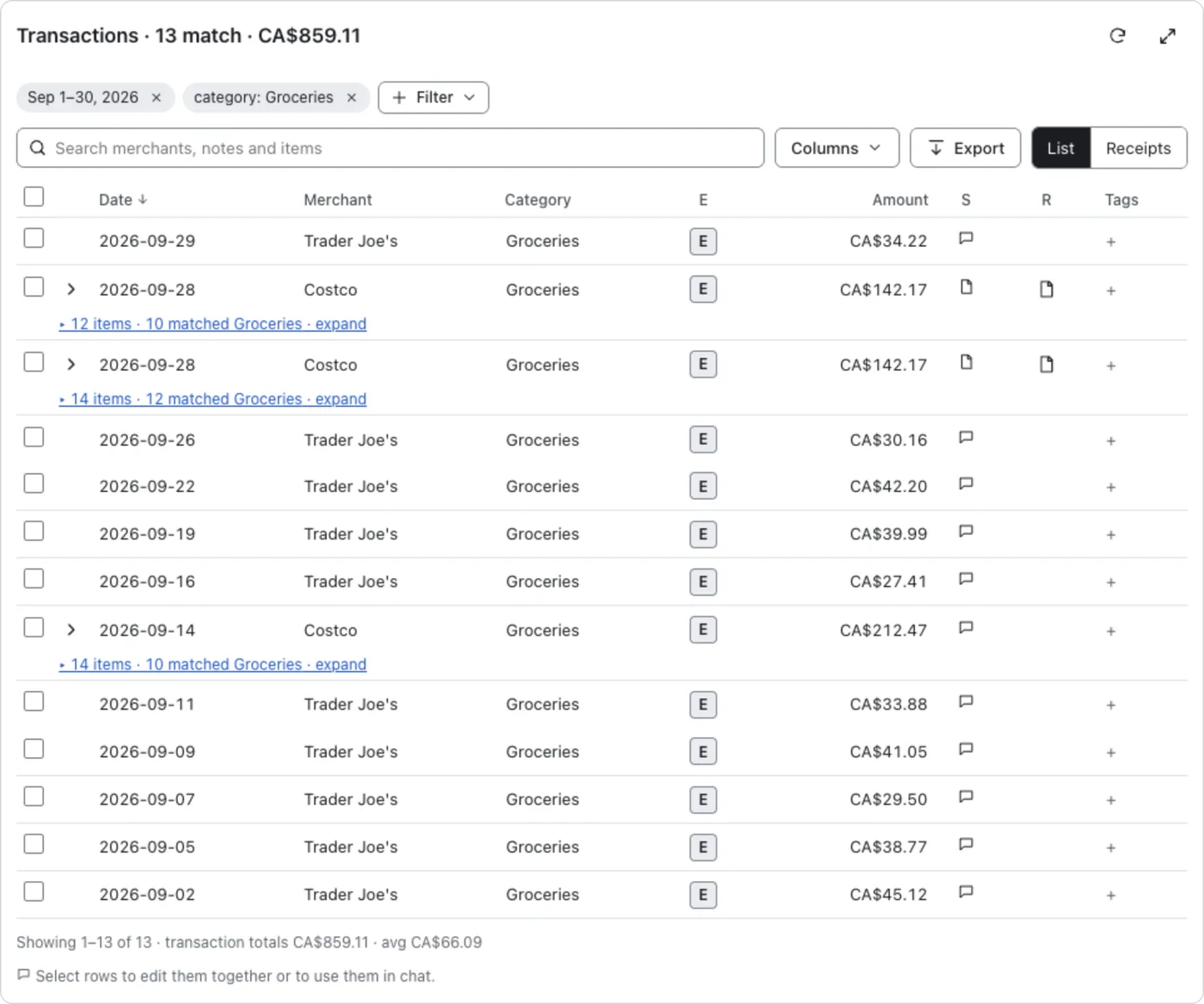
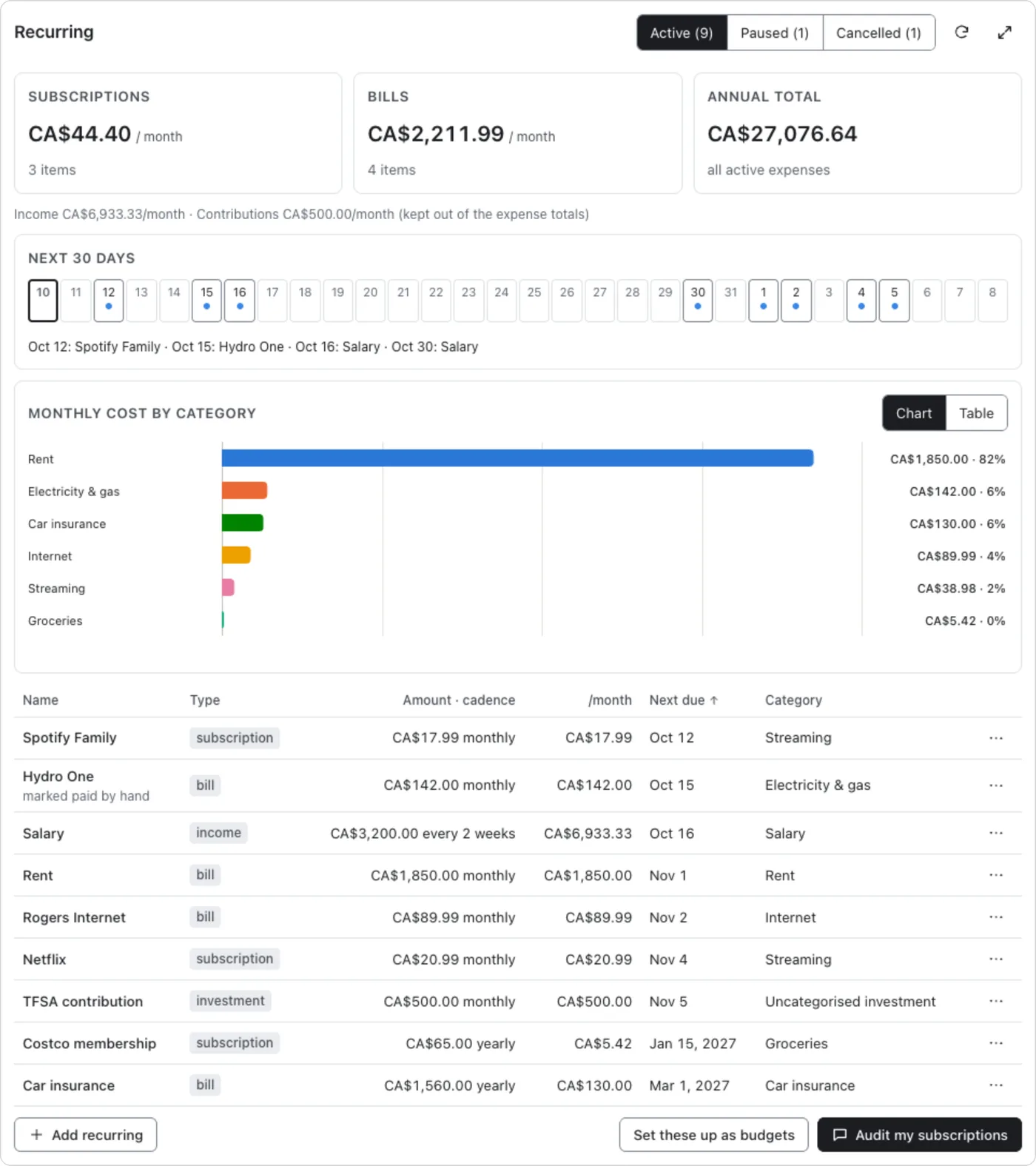
Finances For AI: nine visual, interactive screens, shown inside the chat by AI assistants that support the MCP Apps protocol (including ChatGPT and Claude). Dashboard, Spending Report, Transactions, Receipt Review, Recurring, Net Worth, Goals, Categories and tags, and the Setup Wizard. Each chart has a table view and a drill-down to the transactions behind it. The Dashboard answers “How am I doing this month?” with spent, income, saved and savings rate, every budget as a bar with its share used, and the ones running out. Elsewhere the same answers come as plain text.
4. What does it cost per year, and what does the free tier hold?
Finances in ChatGPT: nothing beyond the plan. OpenAI’s help centre and the pricing page, read on 5 November 2026, list it on Free, Go, Plus and Pro in the United States, with no separate fee. The Experian credit connection is listed for Plus and Pro; we could not confirm it on Free or Go. Outside the United States it is not available on any plan, and OpenAI has published no date for other countries.
Finances For AI: Free is forever, not a trial. 50 logged transactions a calendar month, every screen and report, 1 GB of receipt files, two active goals, export always. Plus is US$24 a year plus applicable taxes: unlimited transactions, unlimited goals, 20 GB of files, receipts by email, cancel any time, and a 30-day money-back guarantee on the first year’s payment. (Just $2 per month.) The plans page has the detail.
On price alone, ChatGPT’s feature wins in the United States: it is free with a free plan. Finances For AI asks for no paid plan either. A Free ChatGPT account can add a custom connector, a Free Claude account can add one, and the same Finances For AI account serves both. What you pay for, if you pay, is the record: a receipt archive, line items, budgets that speak up, and a database that is yours in every assistant and every country.
5. Where does the data live, and what does the AI provider see?
Finances in ChatGPT: the bank connection is Plaid’s; the synced data is stored by OpenAI. OpenAI’s help centre says conversations with Finances follow the same model training setting as the rest of your ChatGPT account, the “Improve the model for everyone” switch under Data controls, so whether your finance chats train the model is up to that switch. Disconnect an account and the synced data is deleted from OpenAI’s systems within 30 days; past conversations and financial memories stay until you delete them. Temporary chats do not touch the linked accounts. On taking the data elsewhere, we found no export of the Finances data, no API and no connector in OpenAI’s material, only the account-wide export of chats.
Finances For AI: one database per account, hosted on Cloudflare, encrypted in transit and at rest. It holds what you log and the receipt files you add, unless you turn image storage off. Card and account numbers are removed from what a receipt records. It holds no bank credentials because it does not connect to a bank; that is how it works, and the cost is that nothing syncs. (We’re considering adding bank account sync. If you’d like it, ask your assistant to log the feature request.) Export is CSV, JSON and a ZIP of receipt files, any time, on any plan, even at the Free plan’s monthly limit. Finances For AI never uses your records for training or ads, on any plan, with no switch to find. What the AI provider sees is the conversation, what you type and what the connector returns, under ChatGPT’s or Claude’s own data controls.
The receipt, and the lines under the total
This is the biggest difference in daily use. A bank feed knows that you spent CA$142.17 at Costco. It does not know that part of it was a toaster, part a prescription, and the rest groceries, so every Costco run is “shopping” or “groceries” as one lump. Finances For AI starts from the receipt. Say “Here’s my receipt” with the photo attached. ChatGPT reads the merchant, date, items, tax and total. Finances For AI checks the maths, catches duplicates, suggests a category per line and opens the review screen. Each line can be essential or not, and each gets its own category, so “what did I spend on groceries?” counts the groceries and not the toaster.
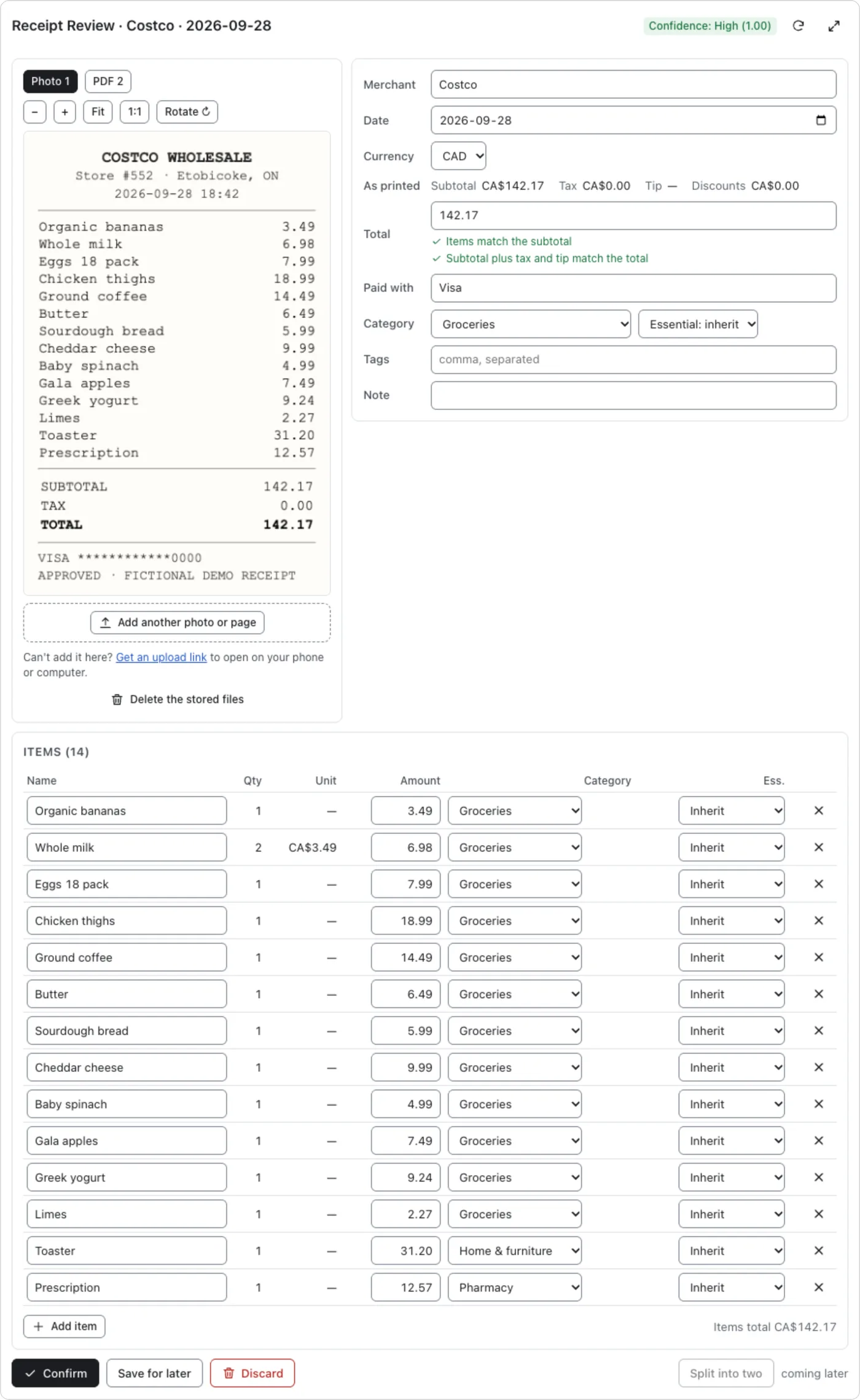
The receipt itself is kept, photo or PDF, all pages, and opens again from the chat whenever you need it: a warranty claim, an expense report, tax time. “Did I buy batteries in March?” has an answer, because the search covers items, not just merchants. A period’s receipts export as a ZIP with a CSV index. ChatGPT can read a receipt photo you paste into any chat, as it always could, but we found no mention of receipts, uploads or line items in the Finances feature itself; the record there is the bank’s transaction, and nothing smaller.
If you ever leave ChatGPT
Finances in ChatGPT lives inside ChatGPT, in one country. Move abroad, or move to another assistant, and it is gone: the data has no export of its own, and nothing outside ChatGPT can read it. Finances For AI is not a feature of any assistant. It is a service you connect to ChatGPT, to Claude, or to both at once, and your data lives in your own account. If one assistant changes its rules, its prices or its availability, the others keep working, and the export is always there.
Who should pick which
Pick Finances in ChatGPT if you are in the United States; if the thing you want is your real accounts, your investments and your credit score read by ChatGPT with no typing; if cash and receipts do not matter much to you; and if living inside ChatGPT alone is fine. It is free, it is read-only, and six months of updates have made it broad.
Pick Finances For AI if you want the record kept by whichever assistant you talk to; if you log by sentence and by receipt, and want each receipt kept and broken into its lines; if budgets that speak up as you log are the kind you keep; if you are outside the United States; if you want a record that is never used for training, with nothing to switch off; and if US$24 a year, or nothing, is the price. If a bank feed is the thing you cannot do without, ChatGPT’s is the one that has it, and we would rather you knew that now.
Both answer the same question, “How am I doing this month?”, in ChatGPT. Only one of them answers it anywhere else.