
Monarch Money is the app most people mean when they say “the Mint replacement”: every account synced, a dashboard, investments, a household, mobile apps, and now an AI assistant inside it. Finances For AI is a different shape altogether. It is a record your own assistant keeps. AI assistants that support the MCP Apps protocol (including ChatGPT and Claude) show its screens in the chat. This comparison is for people deciding between the dashboard and the chat.
Monarch’s strengths come first. Every price and feature claim was checked on Monarch’s own site (monarch.com and its help centre) on 15 October 2026. Where we could not confirm something, we say so. Monarch is Monarch’s trademark.
What Monarch does well
Bank sync through three providers, Plaid, Finicity and MX, so a bank that fails on one can usually connect on another. Investment tracking from connected holdings and manual ones, with the Plus tier adding gains and losses and fund analysis. Receipts attached to transactions: up to three images on web and mobile, PDFs on web, email forwarding, and scanning that matches a receipt to the transaction. An AI assistant inside the app that answers questions about spending, cash flow and net worth, plus AI insights and a weekly recap. iOS, Android and web, in the US and Canada. Years of polish on a product used by a lot of people. If you want everything imported and one place to see it, Monarch is a very good version of that.
1. How does your AI reach it?
Monarch, as of 15 October 2026: it built a connector of its own, then paused it. Monarch’s help article says the implementation is “temporarily paused” because one of its data providers asked it to, “while we work through a question they’ve raised regarding data portability”. The setup instructions were removed, and people connected before 29 June will be emailed when it returns. Until then there are two routes. A CSV export of transactions and balances, web only, which Monarch’s own article suggests uploading to a model of your choice. Or a community-built server such as robcerda/monarch-mcp-server, which signs in with a browser session, is not Monarch’s, and is not covered by Monarch’s support. We could not confirm what the paused connector could do when it was live, because its documentation is gone.
Finances For AI: a remote server you add by address in ChatGPT or Claude, through the Model Context Protocol (MCP), the open standard both assistants use for connectors. The add page has the steps. Sign in with a one-time code by email. One account works in both assistants.
2. Can the AI write as well as read?
Monarch: through the vendor, nothing at the moment, since the connector is paused. Monarch’s in-app assistant answers questions and explains features. Monarch’s help centre does not describe it changing your data. The community server above reads and writes (transactions, rules) and runs read-only by default in its Docker image.
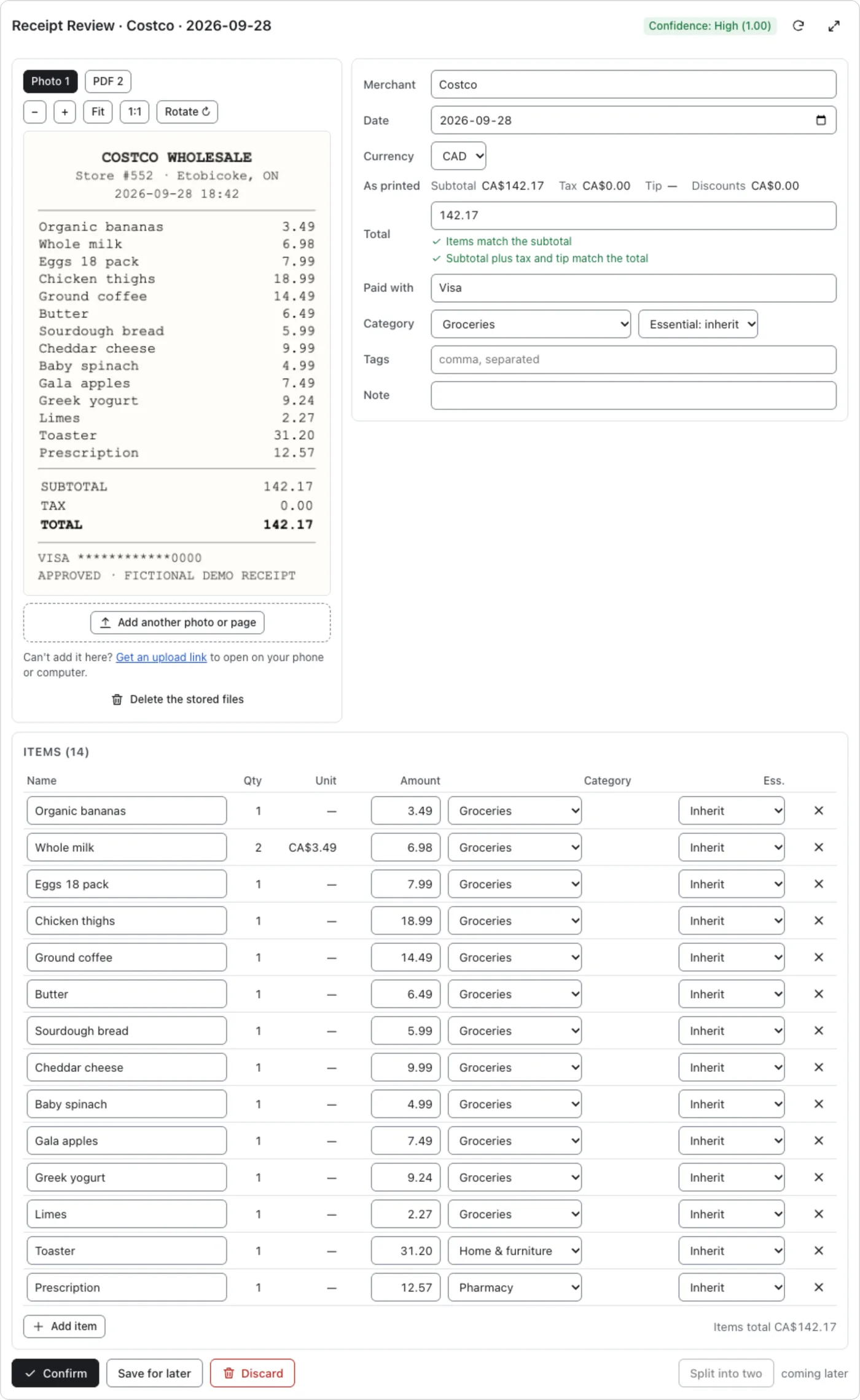
Finances For AI: read and write on both plans, by saying it. “I spent $42 at Costco” logs a purchase. “Add Netflix, $15.49 a month, renews on the 12th” adds a subscription. “Set a $400 budget for takeout” sets a budget. “Here’s my receipt” with a photo logs an itemised receipt after a review screen. Edits work the same way, in words or on the screens.
3. What do you see in the chat?
Monarch: nothing renders inside ChatGPT or Claude. The dashboard, the charts and the AI assistant live inside Monarch’s app and website, which is where Monarch means you to be.
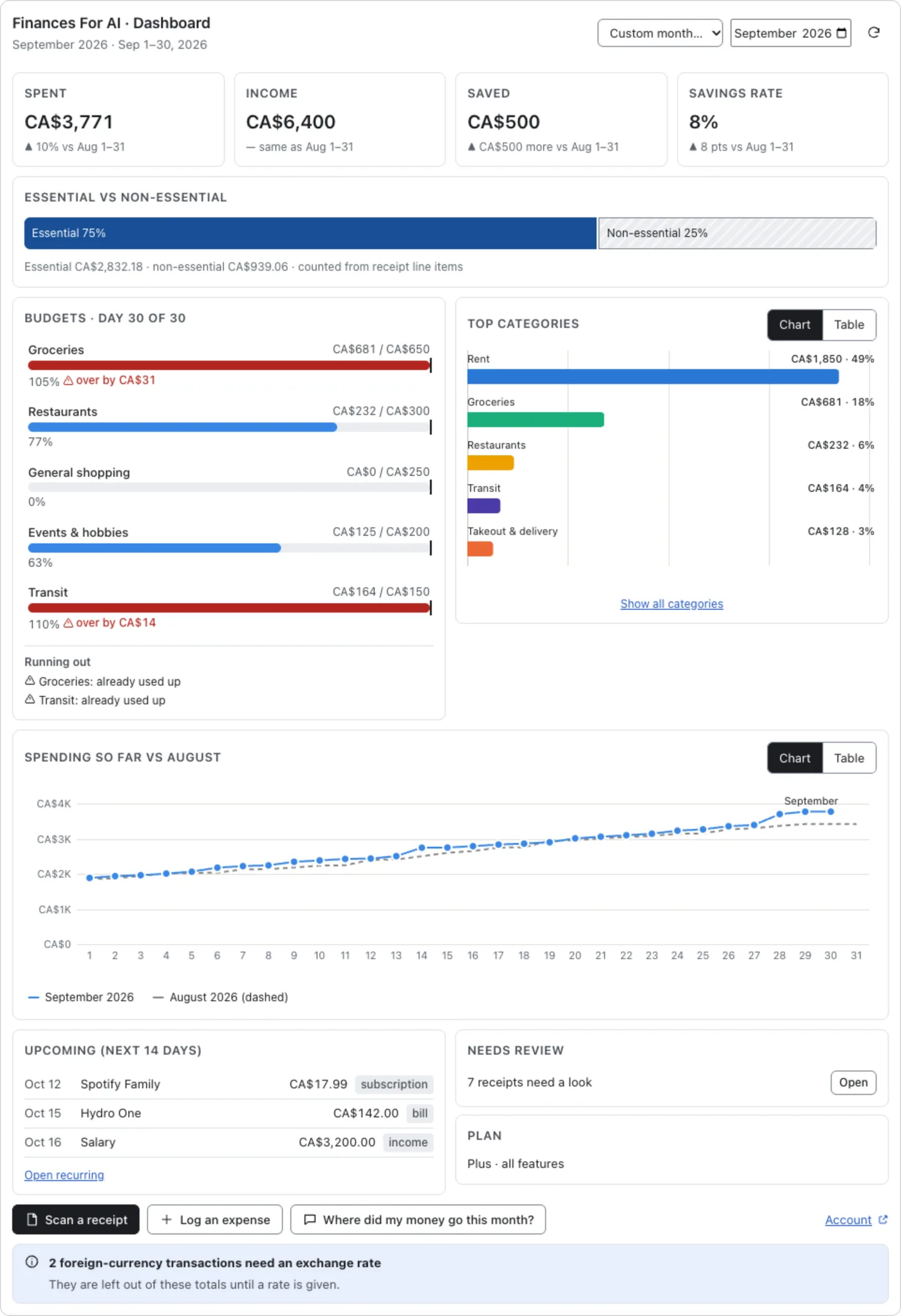
Finances For AI: nine visual, interactive screens, shown inside the chat by AI assistants that support the MCP Apps protocol (including ChatGPT and Claude). The Dashboard is the nearest thing to Monarch’s home screen. It appears when you ask “How am I doing this month?”.
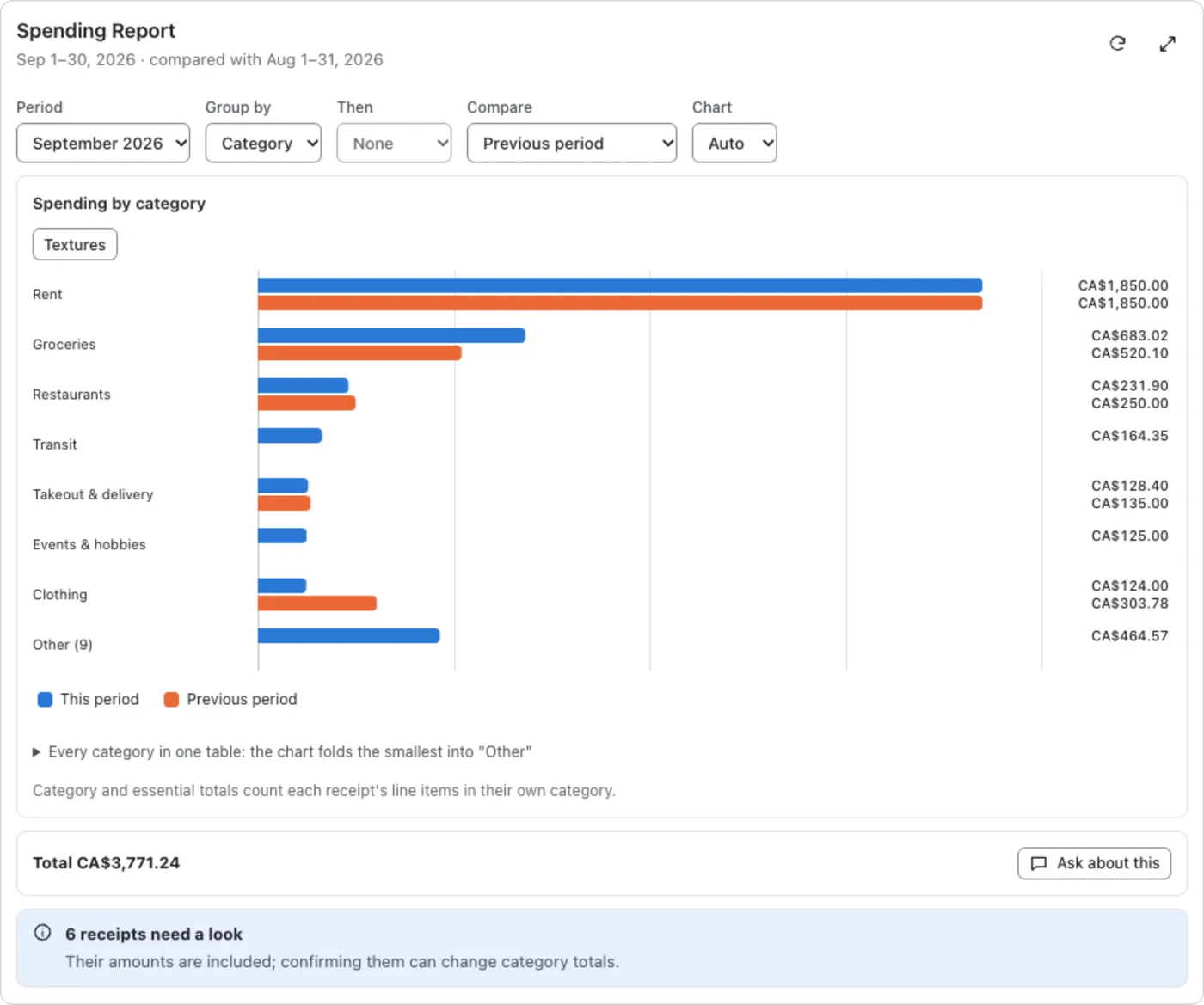
The Spending Report compares a month with the previous period, by category or merchant, as bars, stacked columns or a pie. Each has a table view. Click a bar and the transactions behind it appear under the chart.
4. What does it cost per year, and what does the free tier hold?
Monarch, as quoted on monarch.com on 15 October 2026, billed in US dollars: Core is US$99.99 a year or US$14.99 a month. Plus is US$199.99 a year, billed annually, with the Plus features currently on desktop. There is a seven-day trial, billed when it ends, and no free plan; Monarch’s help centre says it offers paid subscriptions only, with a money-back guarantee. A 30% first-year promotion for new annual Core subscribers was on the page when we checked.
Finances For AI: Free is forever, not a trial. 50 logged transactions a calendar month, every screen and report, 1 GB of receipt files, two active goals, export always. Plus is US$24 a year plus applicable taxes: unlimited transactions, unlimited goals, 20 GB of files, receipts by email, cancel any time, and a 30-day money-back guarantee on the first year’s payment. (Just $2 per month.) The plans page has the detail.
A year of Monarch Core costs about four years of Plus; Monarch Plus, about eight. Part of that is what Monarch buys for you: three aggregators, investment data, mobile apps and a team. You pay Finances For AI for the record only, because your assistant does the reading and there is no aggregator.
5. Where does the data live, and what does the AI provider see?
Monarch: its privacy and security article says data is stored in US-based AWS data centres. Its AI article says Monarch’s in-app AI uses third-party models from providers it names as OpenAI, Anthropic and Google. It sends the minimum data needed, never your name, email or credentials, and those providers do not retain the data or train on it. Automatic categorisation by AI cannot be turned off.
Finances For AI: one database per account, hosted on Cloudflare, encrypted in transit and at rest. It holds what you log and the receipt files you add, unless you turn image storage off. Card and account numbers are removed from what a receipt records. It holds no bank credentials because it does not connect to a bank; that is how it works, and the cost is that nothing syncs. (We’re considering adding bank account sync. If you’d like it, ask your assistant to log the feature request.) Export is CSV, JSON and a ZIP of receipt files, any time, on any plan. Finances For AI runs no model of its own. The AI provider sees the conversation, what you type and what the connector returns, under ChatGPT’s or Claude’s own data controls.
Receipts, which both do, differently
Monarch attaches a receipt to a transaction that the bank already imported, and its scanning can match the two. Finances For AI starts from the receipt. The photo is the transaction, itemised line by line, with the maths checked and a category per item, so “did I buy batteries in March?” has an answer.
Who should pick which
Pick Monarch if you want your accounts imported and reconciled without typing, you track investments, you share the household’s money with a partner, you want mobile apps, and the assistant inside Monarch is enough for now. If the connector comes back, Monarch inside Claude could be a strong combination. This article will say so when it does.
Pick Finances For AI if you already live in ChatGPT or Claude and want the record there, not in another tab; if you would rather log by sentence and by receipt than hand over bank logins; if you want the chart in the chat; and if US$24 a year, or nothing, is what you meant to spend. If a bank feed is the thing you cannot do without, Monarch is the better fit, and we would rather you knew that now.
A fair test for either: ask “What did I spend on groceries last month?” in the place you actually spend your day, and see which one answers.