
YNAB is less an app than a method with software attached: give every dollar a job, move money between envelopes when life changes, and look at the plan before you spend. People who stick with it tend to love it. Finances For AI is a record your own assistant keeps, filled by sentence and by receipt. AI assistants that support the MCP Apps protocol (including ChatGPT and Claude) show its screens in the chat. The two overlap on budgets and part ways on almost everything else.
YNAB’s strengths first. Every price and feature claim was checked on YNAB’s own site on 15 October 2026. Where we could not confirm something, we say so. YNAB is YNAB’s trademark.
What YNAB does well
The method itself, with the software shaped around it: categories as envelopes, assigning income as it arrives, moving money when a category runs over. Bank import through Plaid or MX, in the US, Canada, the UK and the EU, with manual accounts for anything else. Web, iOS and Android. A 34-day trial with no card, and a free year for college students. A public API, documented at api.ynab.com, with personal access tokens anyone can create. Photos attached to transactions on every platform. A community, workshops and a decade of writing about the method. If you want to run your money by envelopes and be taught how, YNAB is the reference.
1. How does your AI reach it?
YNAB offers two things, and it helps to keep them apart.
The first is YNAB’s app inside ChatGPT, invoked with @ynab, which YNAB describes as a separate experience it built. It teaches the method, answers questions about it, opens YNAB articles inside the chat and pops up a debt payoff calculator. It cannot read your transactions, balances or categories, and you do not sign in with your YNAB account. It knows YNAB; it does not know your plan. Nothing of the kind exists in Claude.
The second is YNAB’s API. From Account Settings, then Developer Settings, you create a personal access token. Anything holding that token can read your plan, within a limit of 200 requests an hour. YNAB runs no server of its own for the Model Context Protocol (MCP), the open standard both assistants use for connectors. But several community servers use the token: calebl/ynab-mcp-server, oliverames/ynab-mcp-server and others. YNAB lists some of them on its API page under “works with YNAB” and says they are not affiliated with or connected to YNAB. Setting one up means running a program on your machine, or trusting a hosted one, with a token that can read everything.
Finances For AI: a remote server you add by address in ChatGPT or Claude; the add page has the steps. Sign in with a one-time code by email, and one account serves both assistants. Nothing to run and no token to mind.
2. Can the AI write as well as read?
YNAB: through the API, yes. YNAB’s docs call it “mostly read-only”, but the current specification creates, updates and deletes transactions, creates scheduled transactions and accounts, updates categories and the amounts assigned to them, and updates payees. The category and payee writes arrived in YNAB’s April 2026 update. The community servers expose those writes, usually behind a read-only switch. Through the ChatGPT app, no: it sees no plan to write to.
Finances For AI: read and write on both plans, by saying it. “I spent $42 at Costco” is a purchase. “Set a $500 a month budget for groceries” is a budget. From then on your assistant tells you when it passes 80% and when it runs out. “Here’s my receipt” with a photo is an itemised transaction after a review screen.
3. What do you see in the chat?
YNAB: in ChatGPT, YNAB’s articles and the debt calculator render inside the chat, which is more than most apps offer. Your own numbers do not. Through a community server, text.
Finances For AI: nine visual, interactive screens, shown inside the chat by AI assistants that support the MCP Apps protocol (including ChatGPT and Claude). The one YNAB people will look for first is the budget. The Dashboard shows every category budget as a bar with its share used. It marks the ones that passed and lists what is running out.
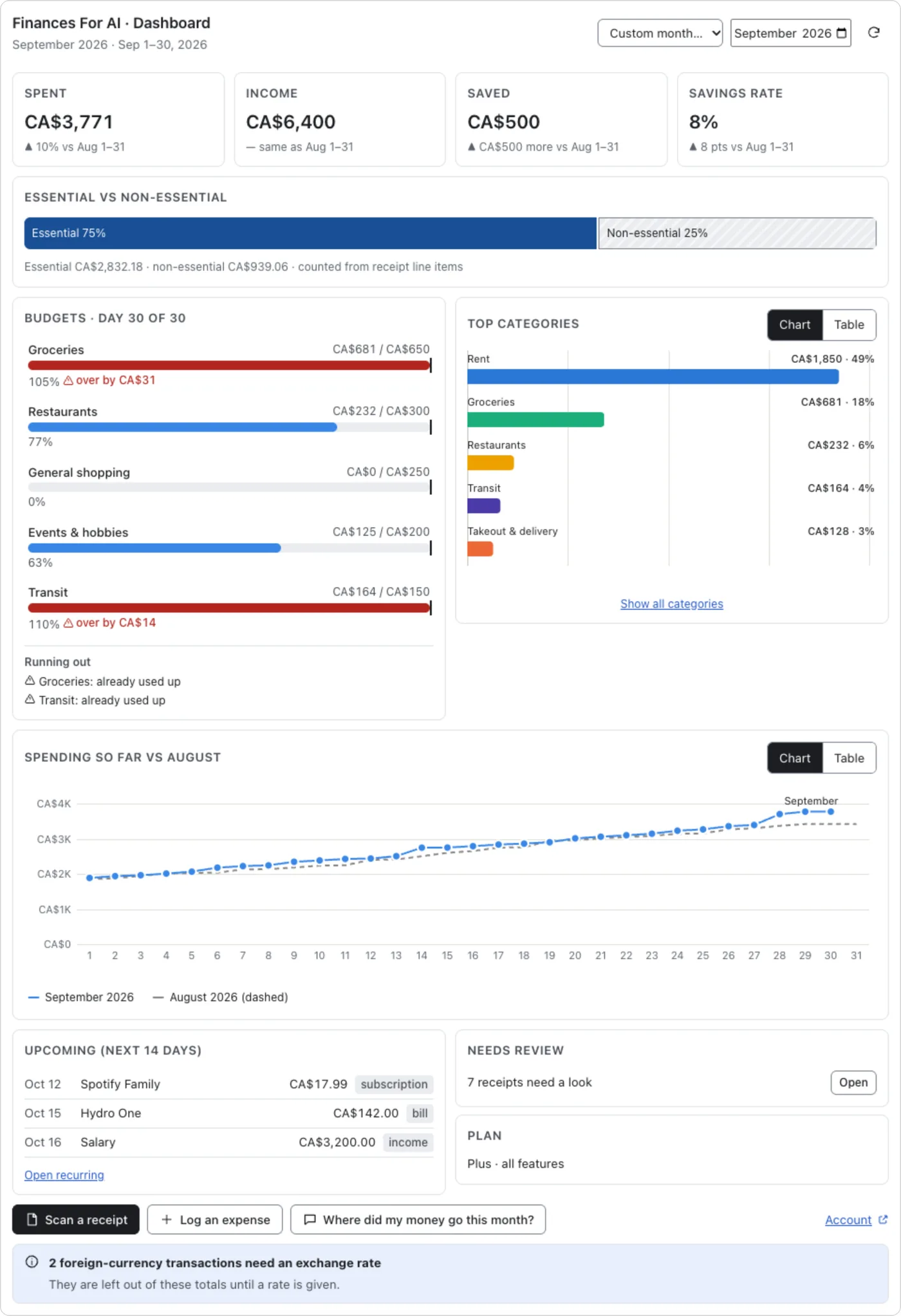
Budgets here are monthly targets per category or overall, not envelopes you move money between. There is no assigning of income to categories and no rollover of an unspent amount. A budget is a line you set, and the record is measured against it. If the envelope mechanics are the point for you, that is a real difference, and YNAB is the one that has them.
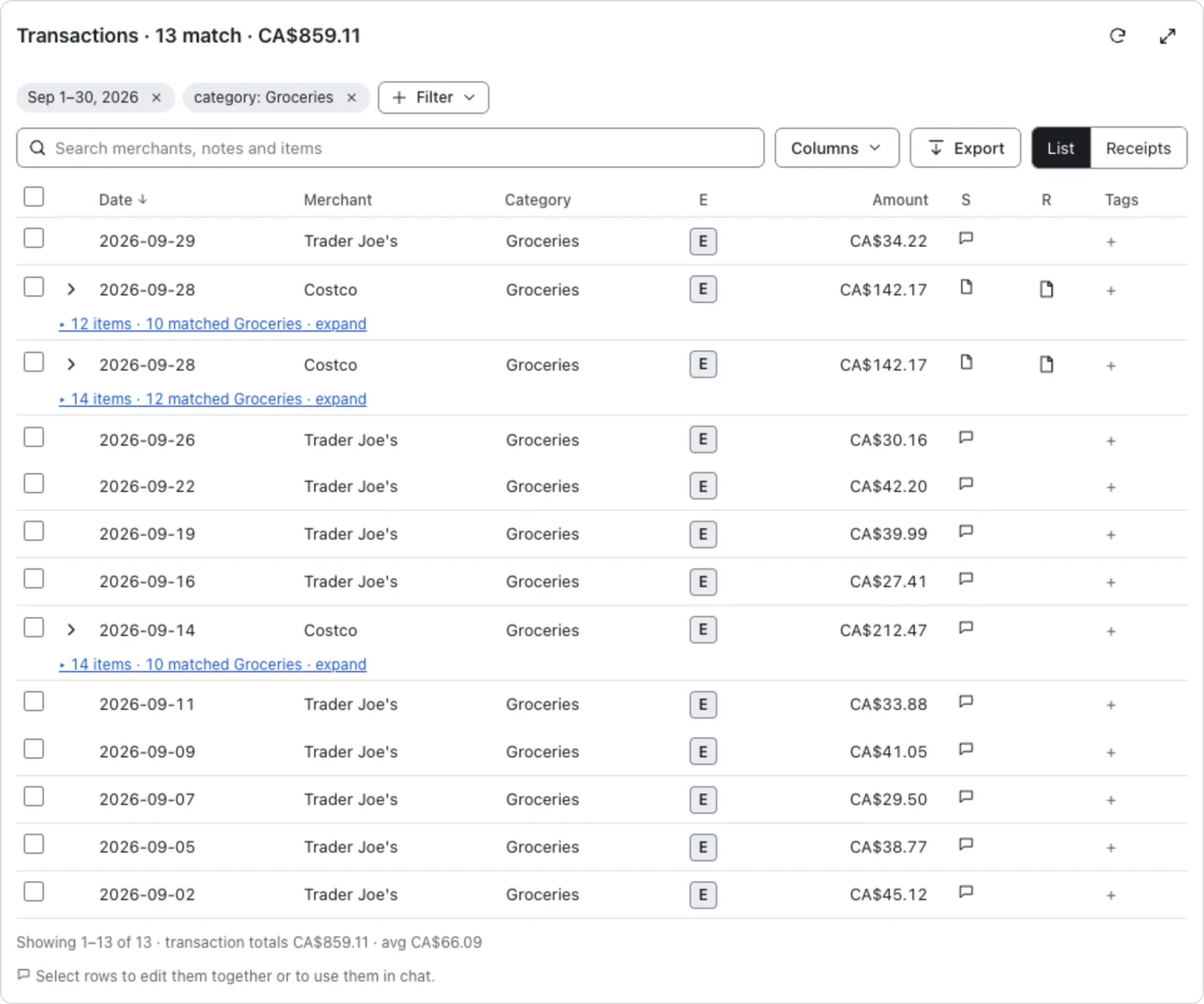
The Transactions screen is a table with filters, search by merchant, note or item, receipts expanded into their lines, and rows you can select and edit together.
4. What does it cost per year, and what does the free tier hold?
YNAB, as quoted on ynab.com/pricing on 15 October 2026: an annual plan at US$109 paid annually, shown as US$9.08 a month, or a monthly plan at US$14.99, both plus tax where it applies. One plan, no tiers. A 34-day trial with no card, a 365-day trial for college students, and no free plan.
Finances For AI: Free is forever, not a trial. 50 logged transactions a calendar month, every screen and report, 1 GB of receipt files, two active goals, export always. Plus is US$24 a year plus applicable taxes: unlimited transactions, unlimited goals, 20 GB of files, receipts by email, cancel any time, and a 30-day money-back guarantee on the first year’s payment. (Just $2 per month.) The plans page has the detail.
A year of YNAB is about four and a half years of Plus. You pay Finances For AI for the record only. The assistant you already pay for does the reading, and there is no bank aggregator to pay.
5. Where does the data live, and what does the AI provider see?
YNAB: its privacy policy, effective 20 April 2026, says data is transferred, processed and stored in the United States. Its security page says the infrastructure runs on Heroku and Amazon Web Services. The policy says YNAB may use artificial intelligence to categorise transactions, tidy merchant names, generate spending insights and assist support, and that its chatbot vendor will not train models on your data. It names no model provider for in-app features. If you use a community server, the token holder and the assistant see whatever the API returns.
Finances For AI: one database per account, hosted on Cloudflare, encrypted in transit and at rest. It holds what you log and the receipt files you add, unless you turn image storage off. Card and account numbers are removed from what a receipt records. It holds no bank credentials because it does not connect to a bank; that is how it works, and the cost is that nothing syncs. (We’re considering adding bank account sync. If you’d like it, ask your assistant to log the feature request.) Export is CSV, JSON and a ZIP of receipt files, any time, on any plan. Finances For AI runs no model of its own. The AI provider sees the conversation, under ChatGPT’s or Claude’s own data controls.
Subscriptions, since YNAB people ask
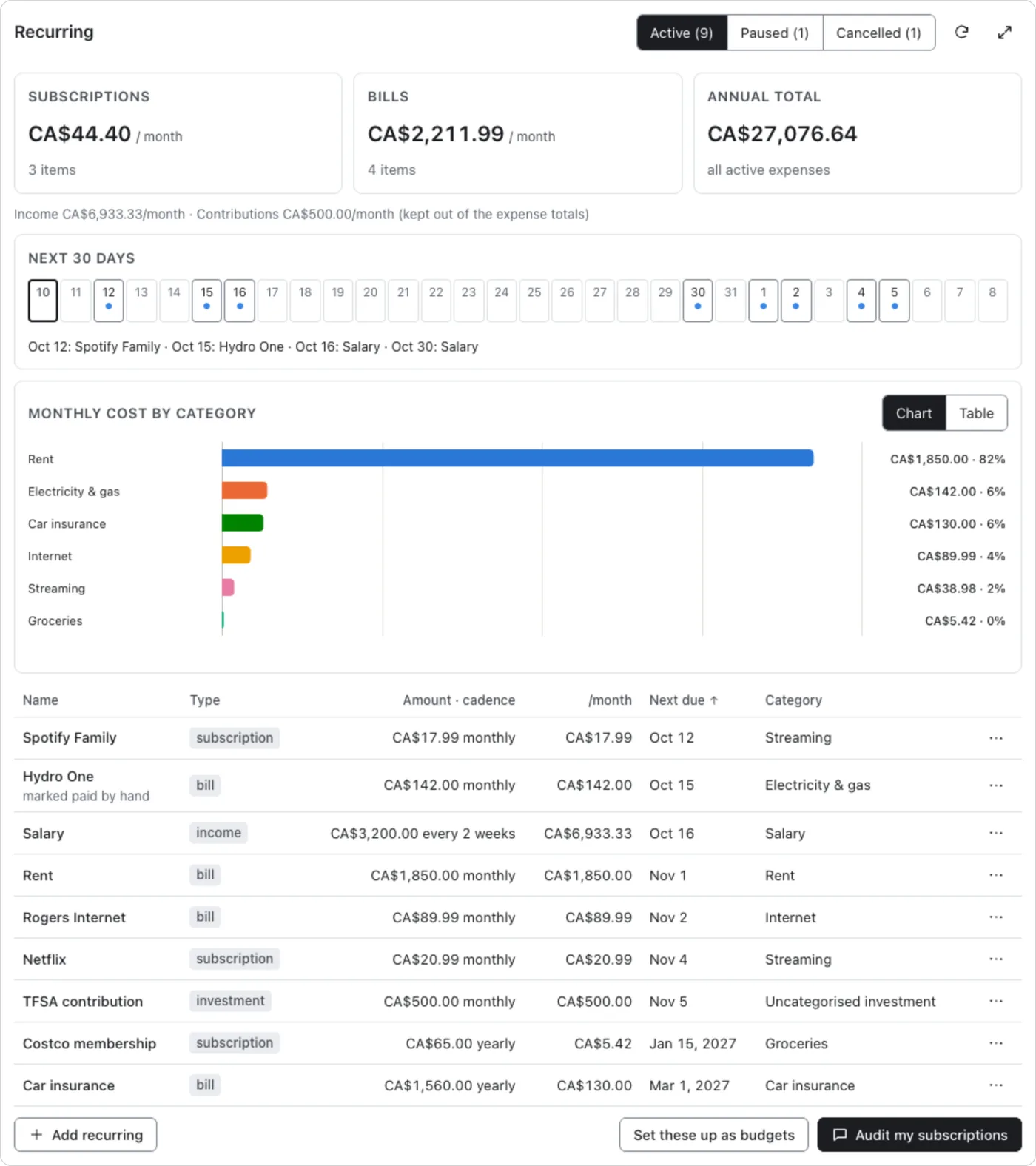
YNAB handles recurring spending as scheduled transactions inside the plan. Finances For AI has a Recurring screen: every subscription and bill with its cadence, monthly equivalent, next due date and category, and a thirty-day strip of what is due. Price changes are kept with their dates. You can mark one paid at a different amount, pause, cancel or skip a month. “Show my subscriptions” opens it.
Who should pick which
Pick YNAB if the envelope method is what you want, or what you already run: assigning income, moving money between categories, the discipline of the plan. If you also want Claude or ChatGPT to read and write that plan, YNAB’s API makes it possible through a community server, with the setup and the trust that implies. YNAB’s ChatGPT app is a good teacher of the method even though it cannot see your numbers.
Pick Finances For AI if you want the record kept by the assistant you already talk to, filled by sentence and receipt rather than imported; if a monthly target per category that speaks up is the kind of budget you keep; if you want the chart and the table in the chat; and if US$24 a year, or nothing, is the price. If bank import or true envelopes are things you cannot do without, YNAB is the better fit.
Either way, the test is the same: “How am I doing this month?”, asked where you actually are.